

DSH Vision Proxy
☆ 1DeepSeek Harness 插件:DeepSeek 大脑 + 自动识图。附加图片自动经 Qwen VLM 转译成文字后交给 DeepSeek 作答
Get this plugin
Review the source, then continue to the publisher.
dsh plugin --profile web add dsh-vision-proxy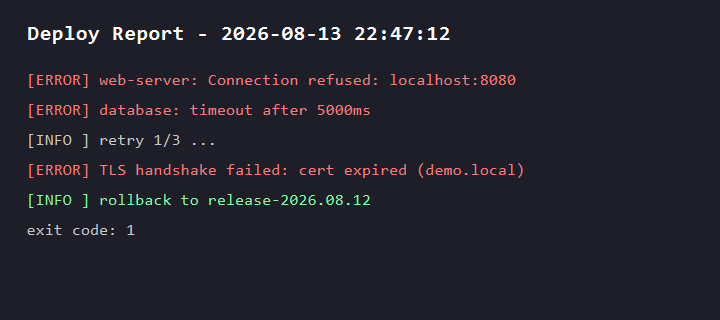
About this plugin
Source snapshot 8/18/2026dsh-vision-proxy
English | 简体中文
DeepSeek brain + automatic image transcription for DeepSeek Harness.
A provider-route proxy plugin: keep using DeepSeek (a text-only line) as the conversation brain, and attach images in the Web GUI anyway — every image is automatically transcribed to text through an OpenAI-compatible VLM (DashScope qwen3.7-flash by default) before the conversation reaches DeepSeek.
Why
DeepSeek Harness natively gates image attachments on the selected model's declared inputModalities. DeepSeek's chat-completions line is text-only, so attaching an image with DeepSeek selected is rejected by design. Existing vision plugins add a view_image tool (works for file paths), but GUI image attachments still fail.
This plugin closes that gap: it registers a new provider route (deepseek-vision) that wraps the real DeepSeek adapter, claims image input (so the preflight admits attachments), and transcribes every image to text in the request stream before delegating to DeepSeek. The conversation is still answered by DeepSeek; vision is an add-on.
user attaches image ──▶ deepseek-vision route ──▶ transcribe via qwen3.7-flash (OCR+layout+details)
                          │                          │
                          ▼                          ▼
                   DeepSeek answers ◀── text-only conversation (images replaced by [图片转译] text)
Live demo: mid-task autonomous vision
This is the exact flow this plugin enables. During a deployment-check task, the agent's tooling returned a screenshot path; the model autonomously decided to look at it and called view_image — the proxy transcribed the image through the VLM, and the model continued its analysis on the resulting text.
Call chain
task: analyze the deploy report
  → tooling returns deploy-report.png (a file path)
  → model autonomously calls view_image("deploy-report.png", "read every line verbatim")
  → qwen3.7-flash transcribes (OCR + layout):
      "Deploy Report - 2026-08-13 22:47:12
       [ERROR] web-server: Connection refused: localhost:8080
       [ERROR] database: timeout after 5000ms
       [INFO ] retry 1/3 ...
       [ERROR] TLS handshake failed: cert expired (demo.local)
       [INFO ] rollback to release-2026.08.12
       exit code: 1"
  → model analyzes the failure from the text and answers
Both autonomous paths are covered:
view_imagetool (any route): whenever an image matters — a screenshot path a tool returned, an image URL, a chart, a UI mockup — the model calls it by itself instead of guessing.- Image-block auto-transcription (on the
deepseek-visionroute): images you attach mid-conversation are transcribed into the next request automatically, so DeepSeek always sees a text-only conversation.
Install
dsh plugin --profile web add github:Flyvhidbwo/dsh-vision-proxy
# or via plugin registry (Marisa / dshx): dshx install dsh-vision-proxy <url>
No build step is involved: the plugin ships compiled lib/ in the repo, so git installs work as-is (no prepare script, no pnpm allowBuilds authorization needed). The package declares dsh.bundle, so the install adds it to the profile's bundle layers automatically.
Then restart dsh web, open the model picker and select DeepSeek + 自动识图 → DeepSeek-V4-Flash (or any model the inner DeepSeek route exposes).
Requirements: dsh >= 0.1.0-rc.6, Node >= 22.19.
Configuration
Config lives in the plugin row (bundle default below; override in your profile's cordis.patch.yml):
- insert:
    - id: dsh-vision-proxy
      name: 'dsh-vision-proxy'
      config:
        baseURL: https://dashscope.aliyuncs.com/compatible-mode/v1
        apiKey: ''            # leave empty to read environment variables
        model: qwen3.7-flash
        maxTokens: 2048
        timeoutMs: 60000
        marker: '[图片转译]'
| Key | Default | Meaning |
|---|---|---|
providerId | deepseek-vision | Route id shown in the model picker |
innerProvider | deepseek-official | Existing adapter route to wrap |
baseURL | DashScope compatible-mode | OpenAI-compatible VLM endpoint (any vendor, Ollama included) |
apiKey | '' | VLM key; falls back to $VISION_API_KEY, then $DASHSCOPE_API_KEY |
model | qwen3.7-flash | Vision model id (e.g. qwen3-vl-flash, glm-4.6v-flash, qwen3-vl:4b for local Ollama) |
maxTokens | 2048 | VLM output cap |
timeoutMs | 60000 | VLM request timeout |
marker | [图片转译] | Marker prepended to each transcription |
Endpoint notes
- DashScope (Alibaba Cloud Model Studio): keep the default
baseURL; key from bailian.console.aliyun.com.qwen3.7-flashis multimodal and cheap. - Zhipu:
https://open.bigmodel.cn/api/paas/v4+glm-4.6v-flash(free tier available). - Local Ollama:
http://localhost:11434/v1+ any vision model, no key needed.
Behavior notes
- Only messages containing image blocks are touched; plain-text conversations hit DeepSeek with zero overhead.
- Transcription is cached per
attachmentId(in-process, capped at 100), so each image is transcribed at most once per process. read_imagealso works on this route (its capability gate reads the same model info).- If the VLM fails (network / quota / missing key), the request fails with a clear message instead of silently dropping the image.
How it works (for plugin developers)
The plugin uses only public harness seams, stable on rc.6:
ctx.llm.registration(innerProvider).adapter— reach the wrapped adapter;ctx.llm.registerAdapter([providerId], proxyAdapter)— register a NEW route (noDUPLICATE_ADAPTERconflict);- proxy
resolveModeloverridesinputModalitiesto['text', 'image']— satisfies the attachment preflight (api-proxy) and theread_imagegate (dsh-tool-fs); - proxy
streamtranscribes image blocks (shape{ type: 'image', attachment }, bytes viactx.get('attachments').readImage(ref)) andyield*s the inner adapter's stream unchanged.
License
MIT
Related DeepSeek Harness Plugins
Browse Developer Tools →
为 DeepSeek Harness (DSH) 插件生态打造的现代化桌面端解决方案。万物皆「插件」,桌面本身也是「插件」。

The plugin market inside DeepSeek Harness — browse, search, one-click install · DSH 可视化插件市场

Whale Girl skin series for DeepSeek Harness. 适用于 DeepSeek Harness 的,鲸鱼娘系列皮肤。

把 DeepSeek Harness 装进你的口袋:电脑上跑 dsh web,手机扫码即同步访问(局域网 + 公网,实时同屏)Put DeepSeek Harness in your pocket: run dsh web on your computer and access it synchronously by scanning a QR code on your phone (LAN + public network, real‑time screen mirroring)