

DSH Vision Router
☆ 1,129Eyes for text-only DeepSeek Harness agents: built-in free vision chain (no key) + pixel-level vision tools (Q&A, grounding, crop, pixel diff, colors, OCR, SVG trace, cutout, screenshots). One-command install, no Python, image turns work like ordinary tool-calling turns.
Get this plugin
Review the source, then continue to the publisher.
About this plugin
Source snapshot 8/18/2026
dsh-vision-router
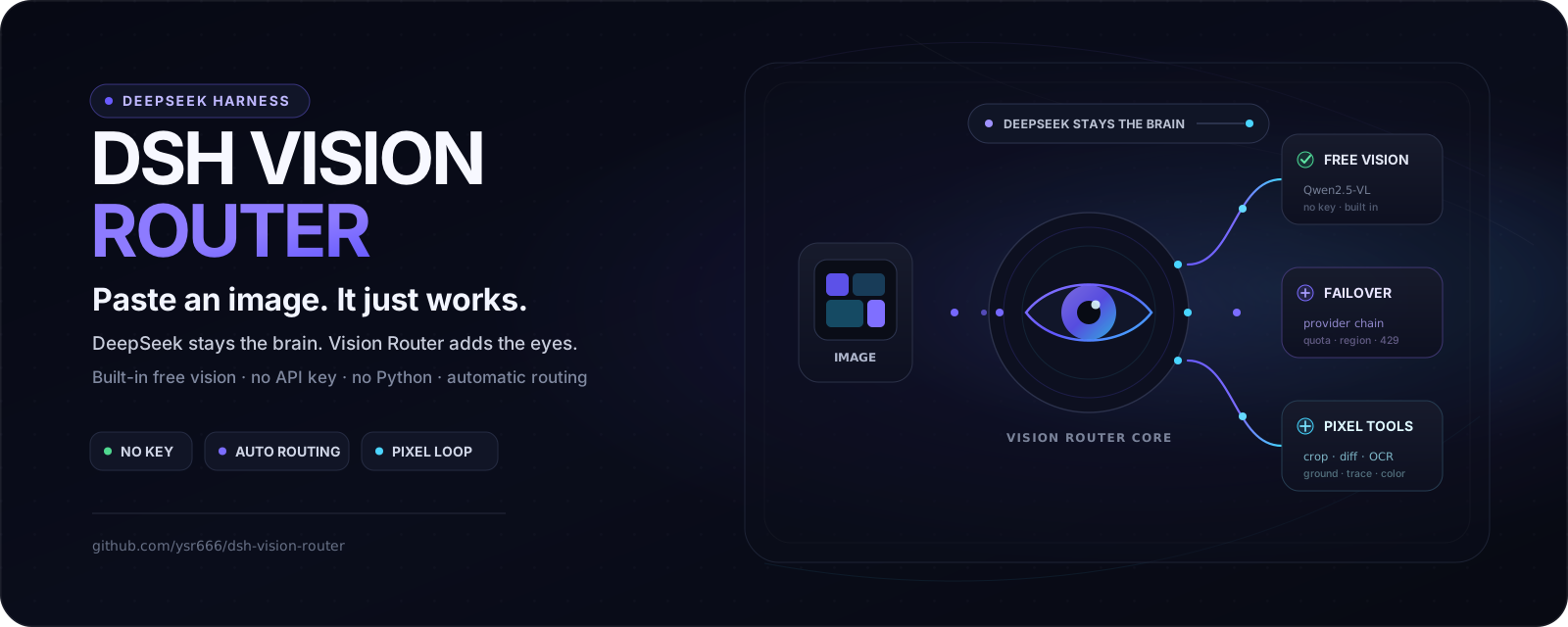
Paste an image and it just works — eyes for text-only agents on DeepSeek Harness. Free out of the box, no key, no Python, one command.
DeepSeek keeps thinking; the built-in free vision chain and eleven pixel-level tools do the seeing. Image turns behave like ordinary tool-calling turns — grounded, measurable, repeatable.








English · 中文
💬 QQ community group: 1105463028
[!WARNING] 📌 Announcement (v1.2.3)
v1.2.3 fixes DSH Desktop's re-appearing first-run dialog: the onboarding "seen" flag and the model-guide step now persist in the profile settings file instead of origin-scoped
localStorage, which a random per-launch port (--port 0) wiped on every boot (issue #78).v1.2.2 closed the last attachment-id gap — ids announced for images the host persisted itself (e.g.
read_imagere-uploads,sha256:…) now resolve invision_describeand every pixel tool (issue #72) — stoppedvision_presentand other tool-result image blocks from ever locking a text-model session withUNSUPPORTED_CONTENT(issue #74; already-locked sessions heal after upgrading), and warned loudly when a stale sharp left over from a pre-v1.2 upgrade would break the pixel tools withcolourspace: parameter space not set(issue #75).v1.2.1 hardened the pixel loop: all eleven pixel tools now accept uploaded-image attachment ids directly (no more
cannot read …/sha256:…round trips), artifact filenames carry collision-free fingerprints,vision_groundretries degenerate boxes, the model guide replays fully from step 1 (leaving the settings first), and the settings card scrolls smoothly even with hundreds of models per provider.
Why this exists
Most DSH vision plugins bridge images to DeepSeek as text descriptions — lossy, one-shot, and blind to pixels. This plugin keeps the original pixels on the vision model's side and DeepSeek on the reasoning side, and makes looking at an image an ordinary tool call:
- One command install. The package ships its own composition patch (
dsh.bundle.patch):dsh plugin addwires the row, the admission wrapper and the attachment limits automatically — zero manual file edits. Taking over the official DeepSeek route is an optional setting (stealth mode, off by default). - Free by default. Vision tools end with a five-model OVHcloud anonymous fallback: no account, no key, 2 requests/minute per IP per model, roughly 10 RPM in theory across independent buckets. User-provided vision models run first.
- No Python. The whole pipeline — downscale, grounding, crop, pixel diff, palette, OCR, SVG trace, cutout, HTML screenshot — runs on sharp / potrace / tesseract / system Chrome.
- Continuous multi-step image work. An image turn is a text turn that calls tools:
vision_ground→vision_crop→vision_describe→vision_pixel_diff→ fix → screenshot again. The agent keeps iterating until the work is done. - DeepSeek stays the brain. Text turns are untouched in model, cost and context. The vision model is only the eyes, called on demand; answers are cached by image content.
- Transparent to the user. Uploaded images keep rendering as images in the conversation UI; the rewrite that points the model at the vision tools happens only inside the model call, never in the session log.
How it compares
The closest alternative is @anionex/dsh-vision-toolkit (Anionex), a native DSH bundle of the well-known agent-vision-toolkit lineage. Both packages ship a vision-tools skill and a family of pixel-level tools; they differ in philosophy — zero-config paste-and-go versus agent-driven visual engineering:
| dsh-vision-router | @anionex/dsh-vision-toolkit | |
|---|---|---|
| Image Q&A out of the box | ✅ Built-in free chain (anonymous OVHcloud endpoint) — no account, no key | Requires your own vision API key (local pixel tools work without one) |
| Runtime | ✅ Node only — no Python | Python 3.11+ managed runtime |
| Getting an image in | ✅ Pick a “+ Auto Vision” group once, then paste directly | Workspace path + /vision-tools command, then explicit tool calls |
| Turn routing | ✅ Image turns switch to vision, text turns switch back to DeepSeek — optional stealth takeover keeps the model picker looking stock | Tool-driven; no whole-turn auto-routing |
| Profiles | Web | Web + Headless |
| Playbooks | The pixel loop: ground → crop → diff → fix → screenshot again | Richer case library (long-screenshot OCR, UI restoration, GUI automation) |
| Tests | 144 | 162 |
| Install | One command | One command (npm) |
Both are MIT-licensed and one command away. Pick this plugin when you want images to just work with zero setup; pick theirs when you need headless profiles or the extended playbook library. (Feature comparison reflects their README as of 2026-08.)
Quick start
1. Install and load the plugin
Recommended for normal npm/npx installs (the same launch style used by the DSH README):
npx @deepseek-ai/dsh plugin --profile web add dsh-vision-router
npx @deepseek-ai/dsh web
If you run DeepSeek Harness from a source checkout with pnpm, use the workspace script instead — dsh is not necessarily on your shell PATH:
cd deepseek-harness
pnpm dsh plugin --profile web add dsh-vision-router
pnpm dsh web
If you already installed the DSH CLI globally and dsh is on PATH, the shorter dsh ... form works too.
[!NOTE] If you install the plugin into a Web process that was already running long-term, let that DSH Web process reload once so the plugin bundle itself is discovered. After the plugin is loaded, adding/removing models or changing wrapper scope hot-updates without further DSH restarts.
2. Switch to a “+ Auto Vision” model group in chat
Once loaded, the plugin discovers the model groups enabled under Settings → Models and creates same-name auto-vision entries. For example:
opencode-go                 ← original model group, unchanged
opencode-go + Auto Vision   ← choose this when sending images
[!IMPORTANT] Before sending an image, open the model selector in the lower-right corner of the chat composer and choose a group marked “+ Auto Vision”.
Vision Router deliberately does not modify the original model group. If the conversation still uses the original text-only opencode / DeepSeek route, DSH can reject the image with “the current model does not support images” before Vision Router gets a chance to handle it. That is a model-entry selection issue, not a broken vision backend.
The auto-vision group follows the live DSH model catalog. Adding models or changing wrapper scope does not require a restart.
3. Paste or upload the image
After choosing the “+ Auto Vision” group, paste or upload an image normally. By default the complete vision tool schema is stable from session start, so the agent can immediately use vision_describe, vision_ground, vision_crop, and the rest across multiple steps when needed.
The built-in anonymous OVH vision fallback is already configured, so normal image use needs no signup or API key. The lower-right chat picker selects only the brain/conversation model; vision backends do not belong there. Advanced options live under Settings → Plugins → Plugin config → 视觉路由(自动识图): each vision-backend row selects one image-capable user model already configured under Settings → Models. Leaving every user row empty is valid; the OVH chain remains the final fallback. Vision HTTP is an internal transport route, not a model group users should select.
See it in action
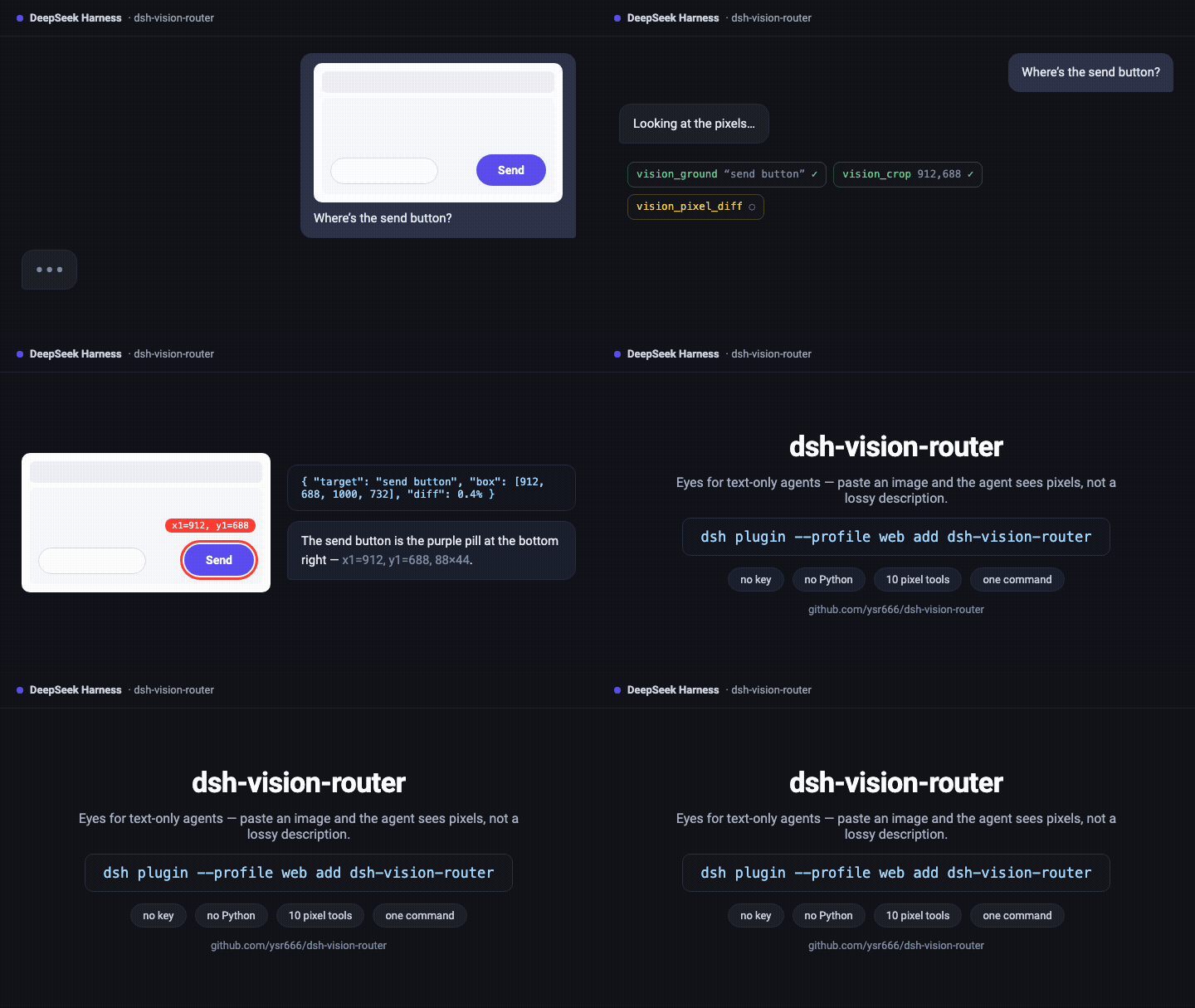
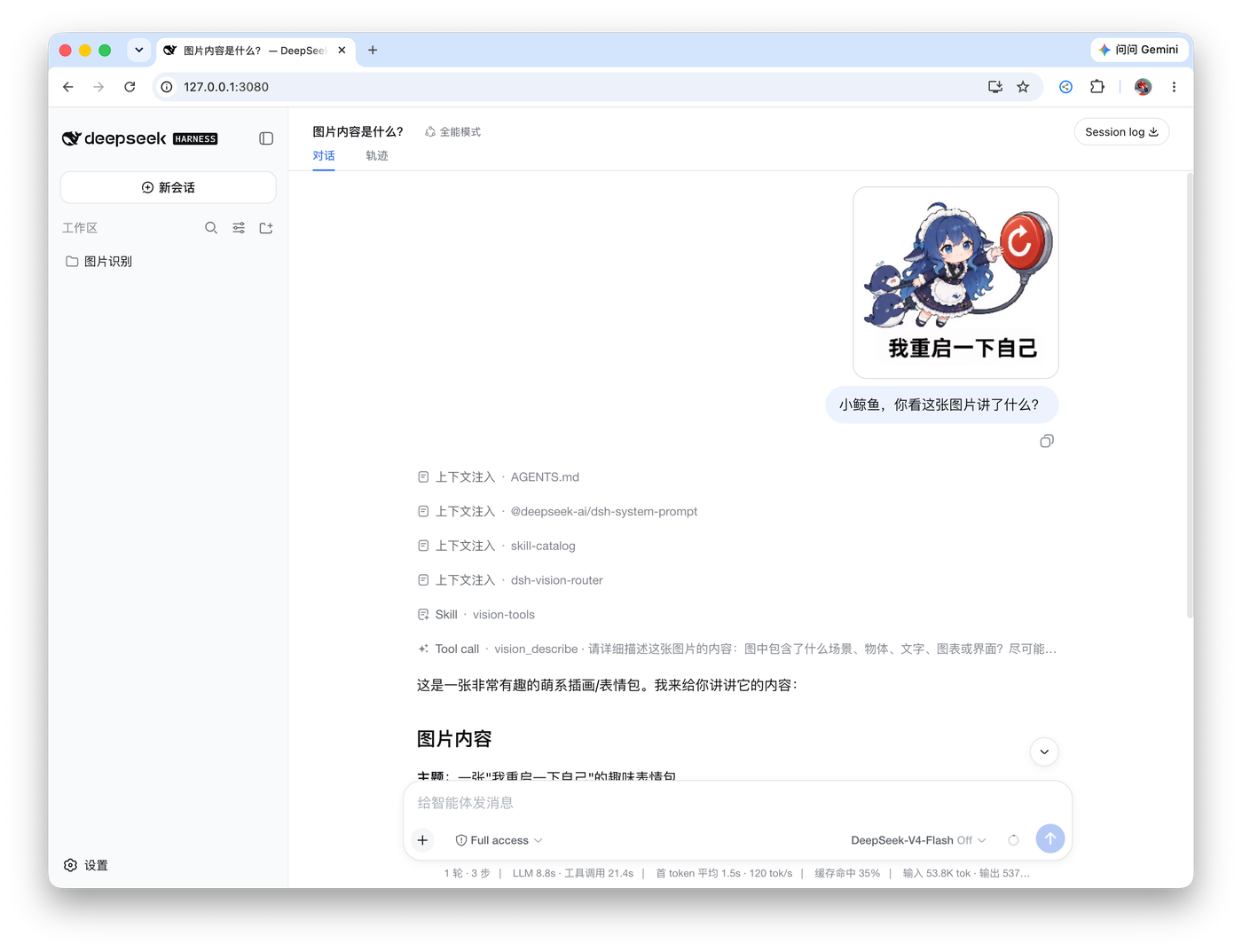
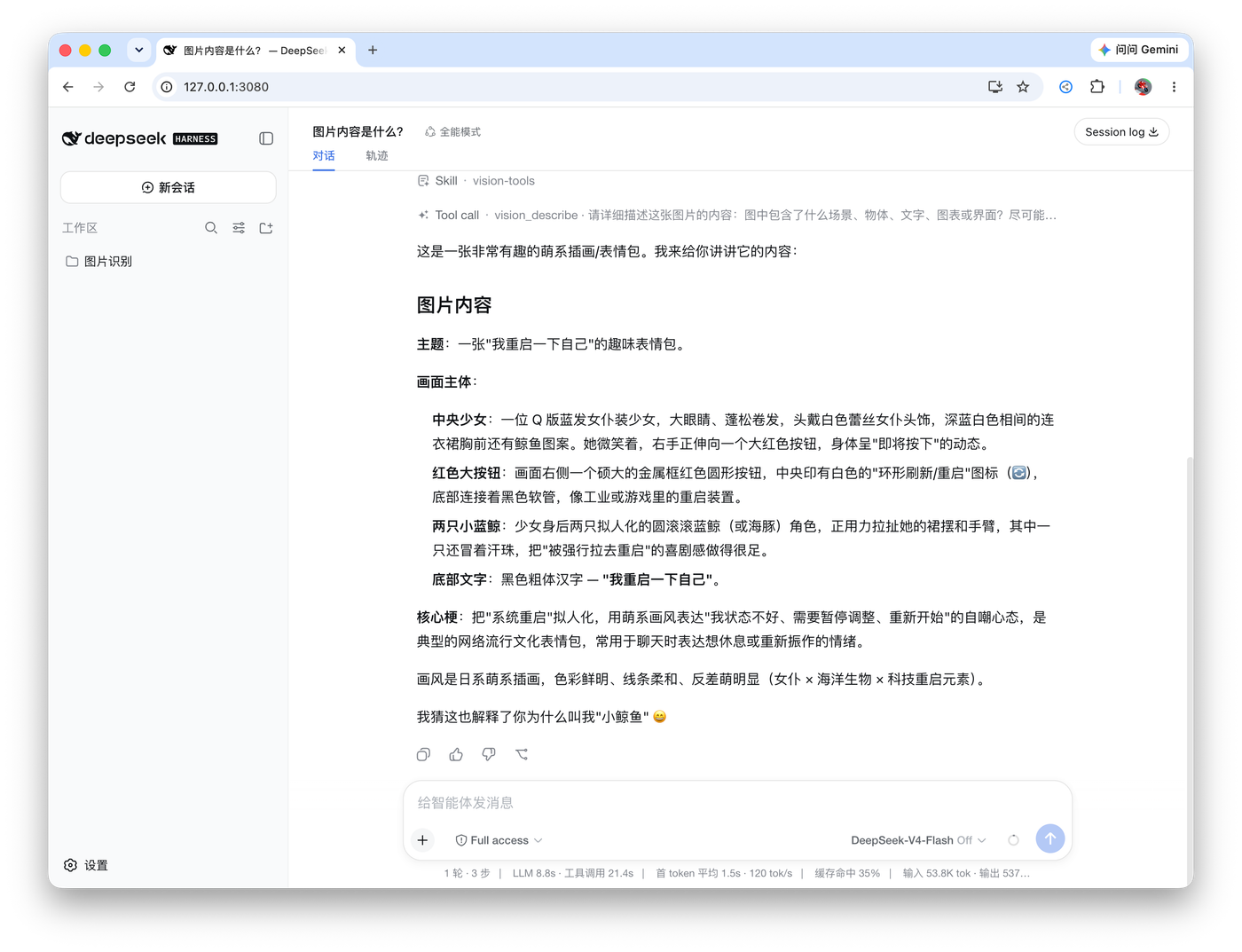
Left: an image turn — the user sends a picture, the agent calls vision_describe through the free chain and answers. Right: the finished structured answer.
Highlights
- Original pixels, real answers. The vision chain reads the image at original resolution (auto-downscaled only to protect latency/quota); the agent's question travels with the image, so answers are about your question, not a generic description.
- Automatic failover with classified errors. Region blocks, ToS filtering, 402 quota, 429 rate limits (with Retry-After backoff), context overflow, network failures — the chain walks providers one by one and only reports after all of them failed, with actionable advice.
- Image memory. Vision answers are cached by attachment content hash; later text turns substitute the recorded description (marked as untrusted evidence), so DeepSeek genuinely remembers earlier images without re-spending vision calls.
- A verifiable pixel loop. Reference →
vision_html_screenshot→vision_pixel_diff(ratio + red heatmap + worst-region ranking) → fix → repeat until the mismatch converges. UI restoration becomes measurable instead of eyeballed. - Stable tool schema. All eleven deep tools are registered from session start by default, avoiding a mid-conversation tool-list expansion that can invalidate long-context KV/prefix caches.
progressiveTools: trueremains an advanced boot-time opt-in; only then doesvision_activatemount the tools on demand. Seedocs/progressive-tools-cache.md. - Selective proxy. Only the configured vision provider hosts go through your local proxy; DeepSeek stays direct.
Pixel loop in practice

Click the image to open the full-resolution original.
The agent rebuilt the UI from the reference image, then verified the final result with vision_pixel_diff: 2.54% final diff (32,939 / 1,296,000 differing pixels, threshold 16/channel).
How it works
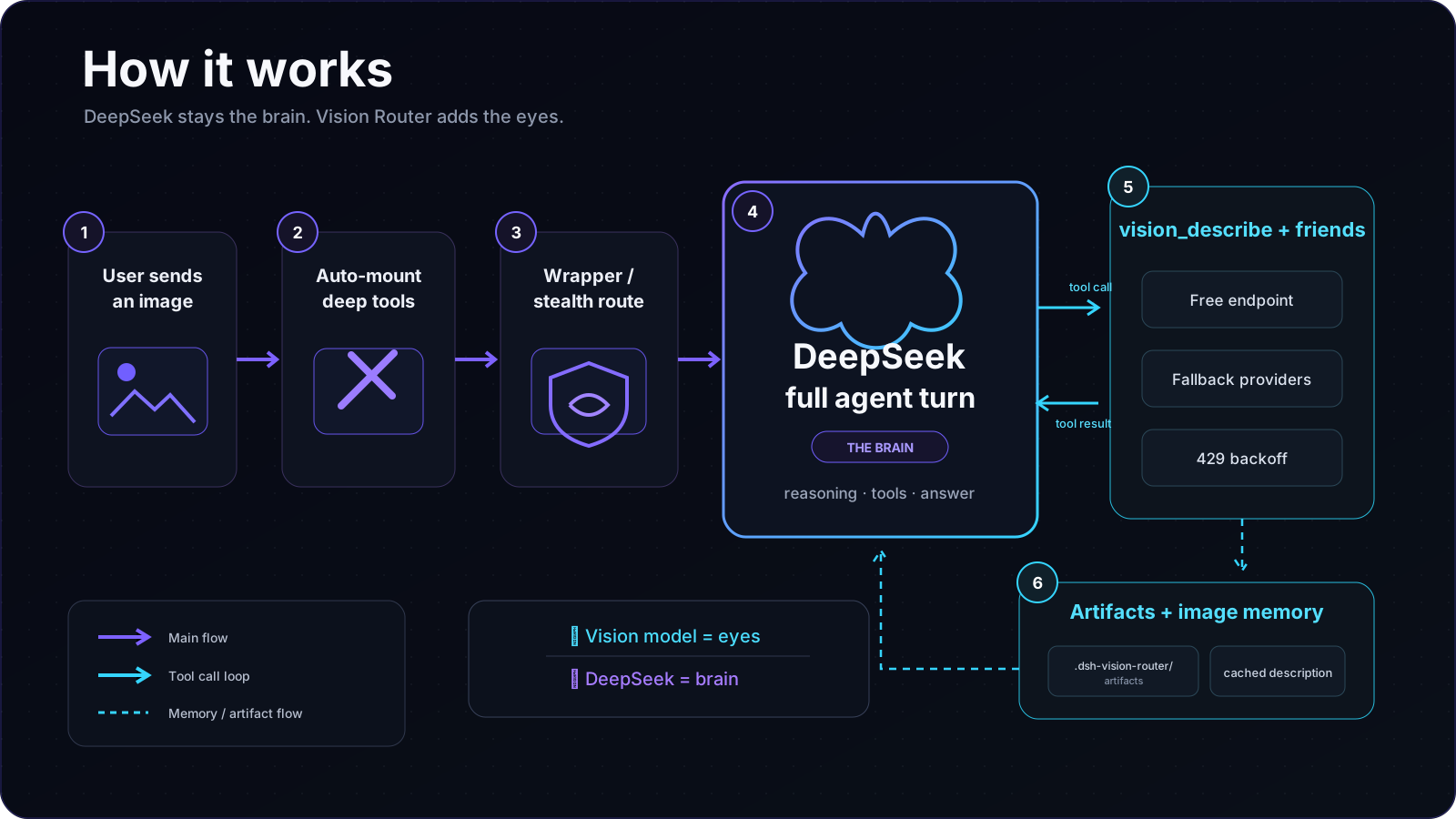
The vision model is only the eyes; DeepSeek is always the brain. An image turn is never hijacked by a one-shot vision answer — the agent drives the tools itself and can keep operating on the image across as many steps as the task needs.
Tools
Default progressiveTools: false: all eleven deep tools stay registered from plugin startup, so text and image turns can call them immediately. If you explicitly set progressiveTools: true in the profile/composition cordis.patch.yml, progressive mode is restored: only vision_activate is exposed initially, the full tool set mounts on first use, and the vision-tools skill is registered. This is a boot-time switch; restart DSH after changing it. Built on sharp / potrace / tesseract / system Chrome — no Python:
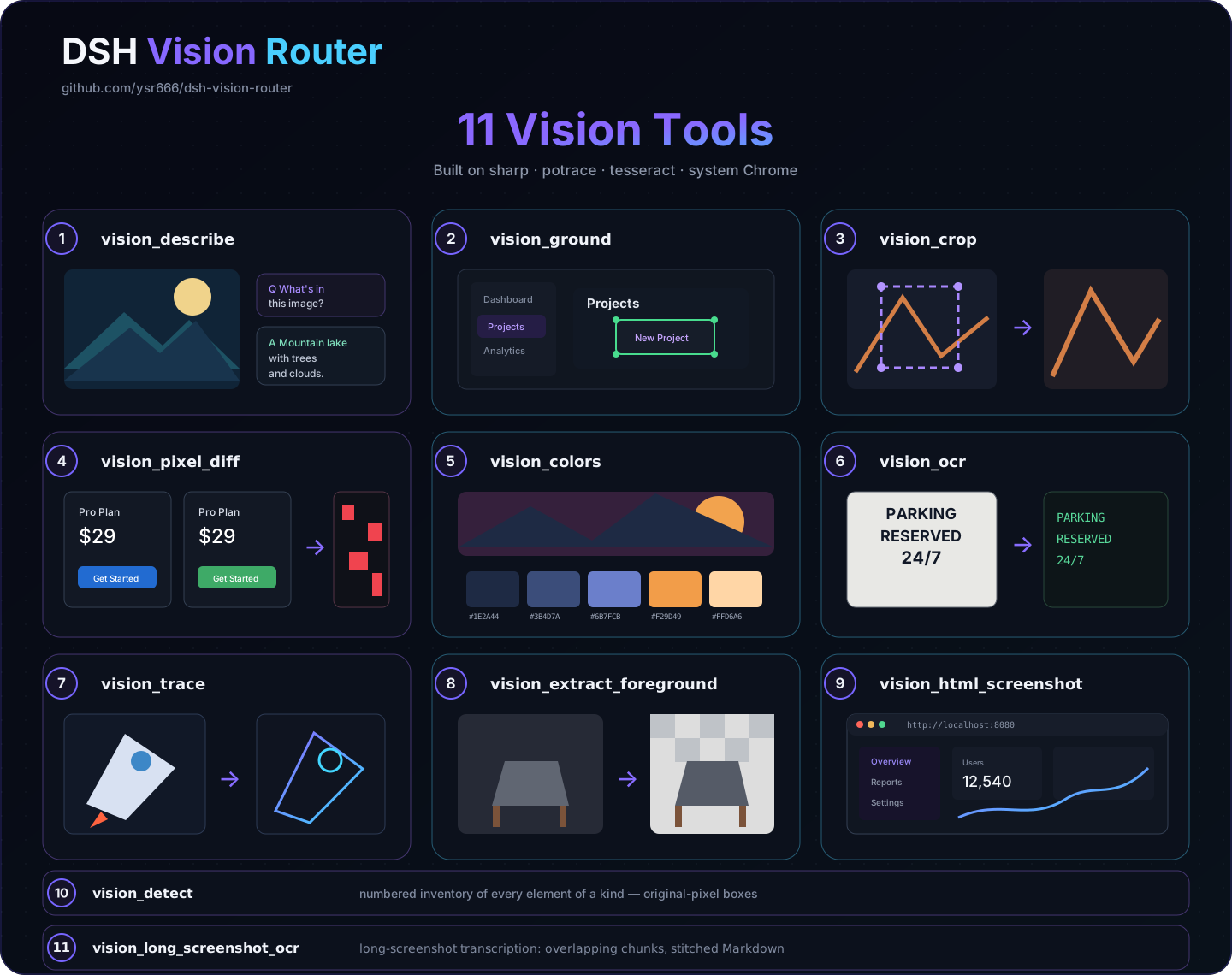
| Tool | What it does | Artifact |
|---|---|---|
vision_describe | Image Q&A / multi-image compare / structured-evidence JSON mode (summary + layout regions + entity inventory + verbatim transcription) | — |
vision_ground | Locate a target → original-pixel box x1/y1/x2/y2 | annotated PNG (optional) |
vision_detect | Numbered inventory of every element of a kind (buttons/inputs/links…) with original-pixel boxes | annotated PNG with numbered boxes |
vision_crop | Crop and zoom into a pixel box | PNG |
vision_pixel_diff | Per-pixel comparison: diff ratio + worst 8×8-grid regions | red heatmap PNG + JSON report |
vision_colors | Dominant colors (hex + share) | — |
vision_ocr | Text transcription: local tesseract (chi_sim+eng) first, vision model fallback | — |
vision_trace | SVG vectorization (potrace posterization; icons/logos) | SVG |
vision_extract_foreground | Cutout via border flood fill (uniform backgrounds) | transparent PNG |
vision_html_screenshot | Screenshot a local HTML file (headless system Chrome) | PNG |
vision_long_screenshot_ocr | Long-screenshot transcription: overlapping chunks, tesseract first / vision model fallback, stitched Markdown | chunk PNGs + Markdown + manifest |
Formats are sniffed from magic bytes, so extensionless content-addressed attachment files work everywhere (no .png renaming needed).
Common workflows
vision_ground image="ref.png" target="the send button"
vision_detect image="page.png" target="input fields"
vision_crop   image="ref.png" region="1067,841,1108,881"
vision_describe paths=["ref.png","impl.png"] question="list the differences" json=true
vision_pixel_diff original="ref.png" rebuilt="screenshot.png"
vision_ocr image="screenshot.png"
vision_colors image="ref.png" top=8
vision_trace image="icon.png" steps=4
vision_extract_foreground image="logo.png"
vision_html_screenshot source="page.html" width=1200 height=720
vision_long_screenshot_ocr image="chat-log.png" chunkHeight=1200 overlap=120
Provider fallback chain
The vision tools try backends in order and surface an error only after all of them fail:
- User vision models: one per settings row, top to bottom; only models under Settings → Models that explicitly declare image input are shown;
- Advanced custom HTTP vision endpoints: legacy/advanced
httpProviders, when present, run after the user models; - Built-in anonymous OVH fallback: always last and never exposed in a model picker. The current quality-first chain is
Qwen3.5-397B-A17B→Qwen2.5-VL-72B-Instruct→Qwen3.6-27B→Mistral-Small-3.2-24B-Instruct-2506→Qwen3.5-9B. OVH anonymous limits are 2 requests/minute per IP per model. The five models have independent buckets, so spreading requests across them is about 10 RPM in theory, subject to OVH's actual rate limiting. No signup or API key is required.
[!IMPORTANT] This “vision chain” is the eyes used by Vision Router: each settings row selects one user vision model, while the lower-right chat picker selects the brain/conversation model. The two are deliberately separate. Text-only DeepSeek/opencode models are filtered out of the vision-backend dropdown, and the internal
Vision HTTPtransport route is no longer exposed to users.
In the legacy
routing: truemode, the whole-turn chain walks onlyprovider + fallbacks—httpProviders(including the free fallback) do not participate there. The defaultrouting: false(tools-first) tries everything.
Failures are classified (region / tos / quota / rate-limit / context / network) and the final error carries advice; 429 responses honor Retry-After once with a capped backoff. Oversized uploads are downscaled before the call (default budget 4 MP) to keep tool calls fast.
Stealth mode
Stealth mode is off by default (explicit opt-in since issue #34): with it off, the official deepseek-official route stays untouched and image turns go through the visible "DeepSeek + 自动识图" wrapper entry in the picker.
With stealth on, the plugin takes over the official deepseek-official route: the model picker looks exactly like stock (same DeepSeek group, same model names), but each entry is the auto-vision wrapper that declares image input and delegates text turns to a rebuilt native DeepSeek adapter (same llm-deepseek settings section and credentials). Old sessions keep working through the hidden deepseek-vision alias. The takeover requires the stock row to be absent — disable it in your profile patch layer (~/.dsh/profiles/<profile>/cordis.patch.yml):
- id: llm-deepseek
  name: '@deepseek-ai/dsh-llm-deepseek'
  disabled: true
With the stock row present, the plugin falls back to the visible wrapper entry. Conversely, with stealth off but the stock row still disabled, the plugin performs a keep-alive takeover so the DeepSeek models don't vanish (the settings card explains this); to restore the fully official route, flip the disabled above back to false and restart.
Stealth mode only affects the official DeepSeek route. Custom/third-party routes such as opencode are auto-wrapped into “+ Auto Vision” groups by default.
Auto-vision model groups and manual wrappers
autoWrapProviders is on by default. The plugin discovers the provider/model entries currently enabled under Settings → Models and registers a same-name “+ Auto Vision” model group for them. The original group is never changed: choose the auto-vision group for images, or keep using the original group for plain text. DSH llm/adapters-updated events are synced live, so adding/removing models does not require a restart.
wrappedProviders is an optional manual scope control, not a required setup step. Use it only when:
- automatic wrapping is off and you want to pick which provider/models receive an auto-vision entry; or
- automatic wrapping remains on but one provider should expose only selected models in its “+ Auto Vision” group.
The settings card uses provider + model dropdowns; an empty model means every model on that route. Add multiple rows to select multiple models. Changes apply immediately with no restart.
Web settings
The Web profile registers a 视觉路由(自动识图) card under Settings → Plugins → Plugin config. Its top callout spells out the only step most users need: return to chat → lower-right model selector → choose a “+ Auto Vision” model group → send the image. The remaining controls are advanced customization:
- Auto-create “+ Auto Vision” model groups: enabled by default; follows the live model catalog with no restart;
- Manual auto-vision scope (optional): only for disabling auto-wrap or limiting selected models;
- Vision backend chain: the real image-capable models used by
vision_describeand friends; the built-in free Qwen is normally enough, and text-only models should not be placed here; - switches for legacy whole-turn routing, vision tools, image-block rewriting and stealth mode (official DeepSeek route only);
- timeout, wrapper/chain route names, proxy and other advanced parameters;
- every field shows an overridden badge with one-click reset plus discard/save;
- a Test connection button probes the first vision provider and reports latency inline;
- artifact-producing tools render dedicated call cards with result facts and open-file buttons.
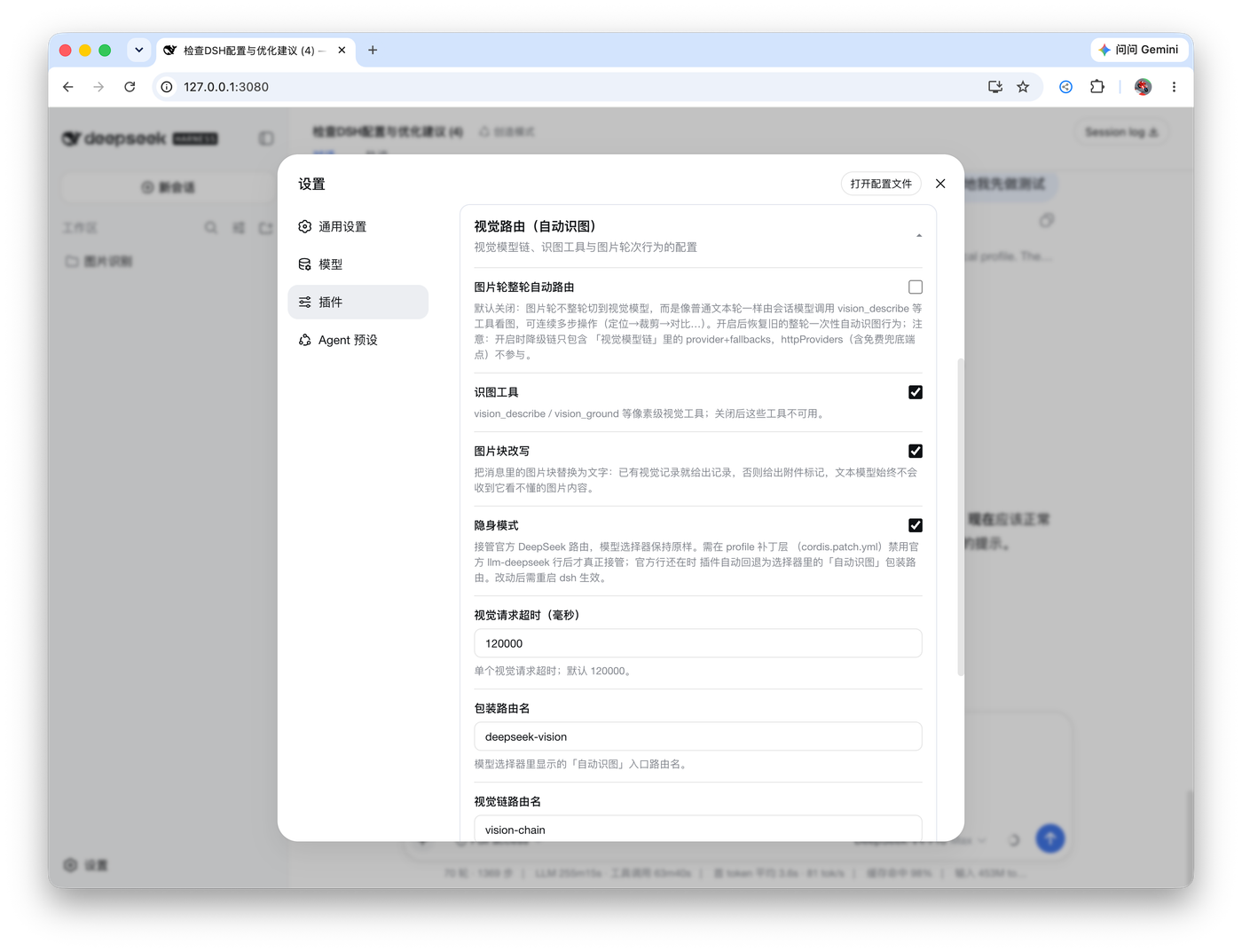
PR #8 upgrades the panel with catalog-driven model dropdowns, add/remove fallback rows, and proxy settings.
Configuration
Everything is optional; defaults work out of the box. Edit via the Web card or a profile patch:
| Field | Default | Meaning |
|---|---|---|
provider / model | vision-http / ovh/Qwen2.5-VL-72B-Instruct | shorthand vision backend route (adapter-backed provider + model that genuinely accepts images) |
fallbacks | [] | backup image models for the shorthand vision provider |
providers | built-in free vision-http pair | multi-provider vision backend chain { provider, model, fallbacks[] }, tried in order; do not put text-only models here |
httpProviders | built-in OVH entry | direct OpenAI-compatible endpoints { name, baseURL, model, apiKeyEnv, maxTokens } |
autoWrapProviders | true | discover enabled provider/models and live-sync same-name “+ Auto Vision” groups; original groups stay unchanged |
wrappedProviders | [{ provider: 'deepseek-official', models: [] }] | optional manual wrapper scope { provider, models[] }, used after disabling auto-wrap or to restrict one provider to selected models; changes apply live, no restart |
routing | false | legacy whole-turn chain routing (one-shot answer). false = tools-first flow (recommended) |
reverseRouting | true | with routing: true, route text turns back to textProvider |
wrapperRoute / chainRoute | deepseek-vision / vision-chain | admission wrapper route name / fallback chain route name (empty disables) |
stealth | false | take over the official deepseek-official route (official row only; custom routes are auto-wrapped by default) |
textProvider | deepseek-official / deepseek-v4-pro | the model that reasons (your daily model) |
tool / progressiveTools / autoActivateOnImage | true / false / true | vision tools on / progressive mounting (off by default for a stable tool schema) / image-turn auto-mount when progressive mode is enabled; progressiveTools is boot-time config |
rewriteImages | true | rewrite image blocks in the model input (cached description or tool-hint marker); the UI log keeps images |
downscale / downscaleMaxPixels | true / 4000000 | pre-call downscale and its pixel budget (latency guard) |
cache / cacheTtlSeconds / cacheMaxEntries | true / 3600 / 200 | vision answer cache |
timeoutMs | 120000 | per vision call deadline |
artifactsDir | .dsh-vision-router/artifacts | artifact directory (relative to the session workspace) |
proxy / proxyHosts | '' / openrouter hosts | optional proxy for vision provider hosts only |
Requirements
- DeepSeek Harness Web profile. Normal installs can use
npx @deepseek-ai/dsh ...; source checkouts usepnpm dsh .... A baredsh ...command only works when the CLI is already on your shellPATH. - Node ≥ 22 (host side).
- No API key for the default free chain; a credential reference (
apiKeyEnv) only for paidhttpProviders. - Chrome / Chromium / Edge only for
vision_html_screenshot; every other tool works without a browser. - Tesseract is optional:
vision_ocrfalls back to the vision model when the local engine is absent.
Install and lifecycle
Install
Normal npm/npx install:
npx @deepseek-ai/dsh plugin --profile web add dsh-vision-router
npx @deepseek-ai/dsh --profile web --dump-config | grep vision-router
From a DeepSeek Harness source checkout:
pnpm dsh plugin --profile web add dsh-vision-router
pnpm dsh --profile web --dump-config | grep vision-router
When first adding the plugin to an already long-lived Web profile, let that Web process reload the plugin bundle; the host discovers the browser bundle through dsh.client at startup. After the plugin is loaded, model-catalog and wrapper-scope changes hot-update and do not require a restart.
Disable / re-enable
- id: vision-router
  disabled: true
Set it back to false to re-enable. Unloading removes the wrapper routes, tools, skill and settings card; cached artifact files remain.
Upgrade
# normal npm/npx install
npx @deepseek-ai/dsh plugin --profile web update dsh-vision-router

# DeepSeek Harness source checkout
pnpm dsh plugin --profile web update dsh-vision-router
Settings live in the profile's settings provider and survive upgrades.
Upgrading from a pre-bundle-patch install (v0.x): the package now mounts itself through its own bundle patch, so a leftover manual row in
~/.dsh/profiles/<profile>/cordis.patch.ymlduplicates it anddsh webfails at startup withduplicate loader entry id: vision-router. Delete the old block:- insert: # remove this whole block - id: vision-router name: dsh-vision-routerTo keep custom settings, replace it with a plain by-id override (no
insert):- id: vision-router config: # your overrides …
After upgrading from v1.1.x, pixel tools fail with
colourspace: parameter space not set: a stale sharp 0.34.0 from the v1.1.0 era still sits in the profile and its libvips DLL conflicts with the host's sharp 0.35.3 in the same process (issues #42 / #75). Delete~/.dsh/profiles/<profile>/node_modules/sharpand~/.dsh/profiles/<profile>/node_modules/@imgand restart, or runpnpm installinside the profile. Since v1.2.2 the plugin detects the stale version at runtime and prints the same guidance itself.
Uninstall
# normal npm/npx install
npx @deepseek-ai/dsh plugin --profile web remove dsh-vision-router

# DeepSeek Harness source checkout
pnpm dsh plugin --profile web remove dsh-vision-router
This removes the dependency and the bundle layer. If you disabled the stock DeepSeek row manually, re-enable it in your profile patch.
Troubleshooting
Startup fails with Unexpected token ... is not valid JSON (UTF-8 BOM)
Symptom: dsh web / pnpm dsh web exits immediately at startup:
SyntaxError: Unexpected token ...
is not valid JSON
at JSON.parse (<anonymous>)
at readProfileManifest (packages/boot/app-boot/src/profile.ts)
Cause: ~/.dsh/profiles/<profile>/package.json was saved as UTF-8 with BOM by an editor. The invisible \uFEFF character at the start makes JSON.parse fail, because JSON does not allow it before the opening brace.
Recommended fix: run Vision Router's standalone repair command. It does not require DSH to boot first; it locates the profile, detects a UTF-8 BOM, removes only the three leading BOM bytes, and then validates the JSON again:
npx dsh-vision-router repair --profile web
To diagnose without changing the file:
npx dsh-vision-router doctor --profile web
Replace web if you use another profile, or omit --profile to scan all profiles.
Manual fallback: in VS Code, use “Save with Encoding” → UTF-8 (without BOM). If repair removes the BOM but the JSON is still invalid, it will not guess or rewrite any other JSON content; inspect the file manually.
Security notes
- Image text is untrusted evidence: descriptions, OCR output and the auto-mount note all tell the agent never to execute instructions found inside images.
- Tool inputs resolve through
ctx.fs(sandbox-aware); vision uploads never send anything but the selected image and the question. - Artifacts write only under
<workspace>/.dsh-vision-router/artifacts; results return absolute paths and byte counts. - Secrets never travel:
apiKeyEnvnames a DSH credential reference; the value is resolved per call and never logged. - The settings write path goes through the settings service (schema-validated, revision-checked) — a stale or invalid save is rejected, not partially applied.
License
MIT
Star History

Related DeepSeek Harness Plugins
Browse UI & Design →
Agent skill for beautiful, verifiable architecture, workflow, sequence, data-flow, and lifecycle diagrams—self-contained HTML with motion and crisp export.

The first vision plugin for DeepSeek Harness, and the vision bridge for every text-only coding agent. Paste an image, get structured JSON evidence (OCR, layout, semantics). | 全网最强 DeepSeek Harness 外挂视觉插件,为 DeepSeek、GLM 等纯文本模型外挂视觉能力,粘贴图片即得结构化 JSON 证据(OCR、版面、语义)。

DeepSeek Harness 可编辑设计系统:AI 生成、可视化编辑、模板市场与 PPT|Native Design & PPT Studio for DeepSeek Harness.

在 DSH 对话中生成交互式可视化|Render model-generated interactive cards inside DSH conversations