

DSH Humanize
☆ 1Humanize RLCR bundle for the DeepSeek Harness: DSH skills, Codex review, and the Humanize trajectory view.
Get this plugin
Review the source, then continue to the publisher.
dsh plugin --profile web add github:dsh-external/dsh-humanize#<commit-or-tag>About this plugin
Source snapshot 8/18/2026Humanize
Current Version: 1.18.0
Derived from the GAAC (GitHub-as-a-Context) project.
A Claude Code plugin that provides iterative development with independent AI review. Build with confidence through continuous feedback loops.
What is RLCR?
RLCR stands for Ralph-Loop with Codex Review, inspired by the official ralph-loop plugin and enhanced with independent Codex review. The name also reads as Reinforcement Learning with Code Review -- reflecting the iterative cycle where AI-generated code is continuously refined through external review feedback.
Core Concepts
- Iteration over Perfection -- Instead of expecting perfect output in one shot, Humanize leverages continuous feedback loops where issues are caught early and refined incrementally.
- One Build + One Review -- Claude implements, Codex independently reviews. No blind spots.
- Ralph Loop with Swarm Mode -- Iterative refinement continues until all acceptance criteria are met. Optionally parallelize with Agent Teams.
- Capability Anchors -- Generated plans include a feature/capability map, and RLCR rounds keep Claude and Codex anchored to the relevant capability node.
- Begin with the End in Mind -- Before the loop starts, Humanize verifies that you understand the plan you are about to execute. The human must remain the architect. (Details)
How It Works
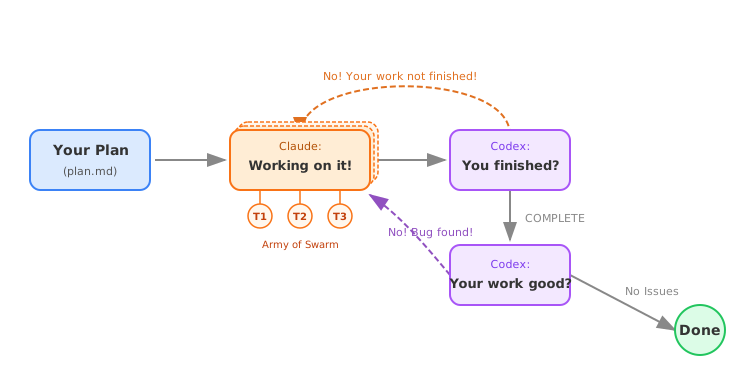
The loop has two phases: Implementation (Claude works, Codex reviews summaries) and Code Review (Codex checks code quality with severity markers). Issues feed back into implementation until resolved.
Install
# Add PolyArch marketplace
/plugin marketplace add PolyArch/humanize
# If you want to use development branch for experimental features
/plugin marketplace add PolyArch/humanize#dev
# Then install humanize plugin
/plugin install humanize@PolyArch
Requires codex CLI for review. See the full Installation Guide for prerequisites and alternative setup options.
DeepSeek Harness
Humanize is also available as a standard DeepSeek Harness profile bundle.
The DeepSeek V4 Flash Max builder agent runs the RLCR loop inside a DSH
session while the Codex review agent independently gates progress. The
bundle registers these skills: humanize, humanize-rlcr, ask-codex,
humanize-gen-plan, and humanize-refine-plan; it also mounts the Humanize
trajectory view in the latest DSH web client.
# Install the standard bundle into the web profile.
dsh plugin --profile web add github:dsh-external/dsh-humanize#<commit-or-tag>
Git installs build the web client through the bundle's prepare script. If
pnpm blocks that build, add the exact package key it prints to
$DSH_HOME/profiles/web/pnpm-workspace.yaml under allowBuilds, then rerun the
command. Configure the builder model (deepseek-v4-flash-max) in the DSH model
settings — the full walkthrough is in the
Installation Guide for DeepSeek Harness.
Quick Start
-
Generate an idea draft from a loose thought (optional — skip if you already have a draft):
/humanize:gen-idea "add undo/redo to the editor"Output goes to
.humanize/ideas/<slug>-<timestamp>.mdand a companiondirections.jsonartifact. Pass a.mdpath to expand existing rough notes.--ncontrols how many parallel directions explore the idea (default 6). -
Explore directions as parallel prototypes (optional — skip if you want to go straight to planning):
/humanize:explore-idea .humanize/ideas/<slug>-<timestamp>.directions.jsonDispatches bounded parallel prototype workers (one per direction), each running in an isolated git worktree. After all workers complete, writes
.humanize/explore/<run-id>/explore-report.mdfor audit/ranking details and.humanize/explore/<run-id>/final-idea.mdas the plan-ready synthesis. Worker worktrees are optional prototype fast paths; the default follow-up is to generate a clean plan fromfinal-idea.md. -
Generate a plan from your draft or explored final idea:
/humanize:gen-plan --input .humanize/explore/<run-id>/final-idea.md --output docs/plan.mdAdd
--coachto run mandatory short-answer stage quizzes after each planning stage. Normal plan decision questions stay separate; quiz mismatches are treated as design drift, AI design correction, or background gaps before the agent expands the next planning layer. Generated plans include aFeature Map / Capability Mapbefore the task breakdown so each task carries its global capability context. -
Refine an annotated plan before implementation when reviewers add comments (
CMT:...ENDCMT,<cmt>...</cmt>, or<comment>...</comment>):/humanize:refine-plan --input docs/plan.md -
Run the loop:
/humanize:start-rlcr-loop docs/plan.mdWhen the plan has a capability map, RLCR records a
Capability Anchorin each round contract and Goal Tracker active task so Claude coding and Codex review stay aligned with the map. -
Consult Gemini for deep web research (requires Gemini CLI):
/humanize:ask-gemini What are the latest best practices for X? -
Monitor progress (in another terminal, not inside Claude Code):
source <path/to/humanize>/scripts/humanize.sh # Or just add it into your .bashec or .zshrc
humanize monitor rlcr       # RLCR loop
humanize monitor skill      # All skill invocations (codex + gemini)
humanize monitor codex      # Codex invocations only
humanize monitor gemini     # Gemini invocations only
Documentation
- Usage Guide -- Commands, options, environment variables
- Install for Claude Code -- Full installation instructions
- Install for Codex -- Codex skill runtime setup
- Install for Kimi -- Kimi CLI skill setup
- Configuration -- Shared config hierarchy and override rules
- Bitter Lesson Workflow -- Project memory, selector routing, and delta validation
License
MIT
Related DeepSeek Harness Plugins
Browse Developer Tools →
为 DeepSeek Harness (DSH) 插件生态打造的现代化桌面端解决方案。万物皆「插件」,桌面本身也是「插件」。

The plugin market inside DeepSeek Harness — browse, search, one-click install · DSH 可视化插件市场

Whale Girl skin series for DeepSeek Harness. 适用于 DeepSeek Harness 的,鲸鱼娘系列皮肤。

把 DeepSeek Harness 装进你的口袋:电脑上跑 dsh web,手机扫码即同步访问(局域网 + 公网,实时同屏)Put DeepSeek Harness in your pocket: run dsh web on your computer and access it synchronously by scanning a QR code on your phone (LAN + public network, real‑time screen mirroring)