

DSH Automation
☆ 84DSH 自动化插件:让 Coding 任务按计划在全新 Agent Session 中运行,并由用户或 Agent 创建和管理定时任务。 / Run coding tasks in fresh Agent sessions and manage schedules from DSH Web or an Agent.
Get this plugin
Review the source, then continue to the publisher.
dsh plugin --profile web add github:titanwings/dsh-automation#v0.1.6
About this plugin
Source snapshot 8/18/2026⏱️ dsh-automation
Run coding tasks on schedule. Manage them from Web or Agent.





|
🕒 Need recurring or one-shot coding work to run later without relying on an old chat? |
✨ dsh-automation turns all three requirements into one workflow.
Create and manage schedules from DSH Web or any eligible root Agent. Every dispatched occurrence starts in a fresh root Agent and Session, then leaves an auditable record.
Self-contained task + schedule + permission boundary → fresh root Agent + fresh Session + durable run history
Why automation · Features · Install · Quick start · Safety · Technical details
English · 简体中文
🎯 Why automation
DSH Core Schedule is the right tool for reminders in the current conversation: “come back to this Session in ten minutes.” dsh-automation handles a different job: “run this complete task independently every weekday and leave me a result I can inspect.”
| DSH Core Schedule | dsh-automation | |
|---|---|---|
| Execution context | Returns to the same live Agent | Starts a fresh root Agent and Session |
| Input | A follow-up inside existing context | A saved, self-contained task |
| Scope | Current Session Log | One canonical DSH workspace |
| History | Conversation events | Definition revisions and durable run records |
| Best for | Reminders and same-chat follow-ups | Repeated or one-shot standalone coding work |
If a task depends on unstated chat history, needs an interactive approval halfway through, or should react to a file, HTTP, or process condition rather than time, it is not a good automation yet.
✨ Features
🕹️ One control plane, two ways in
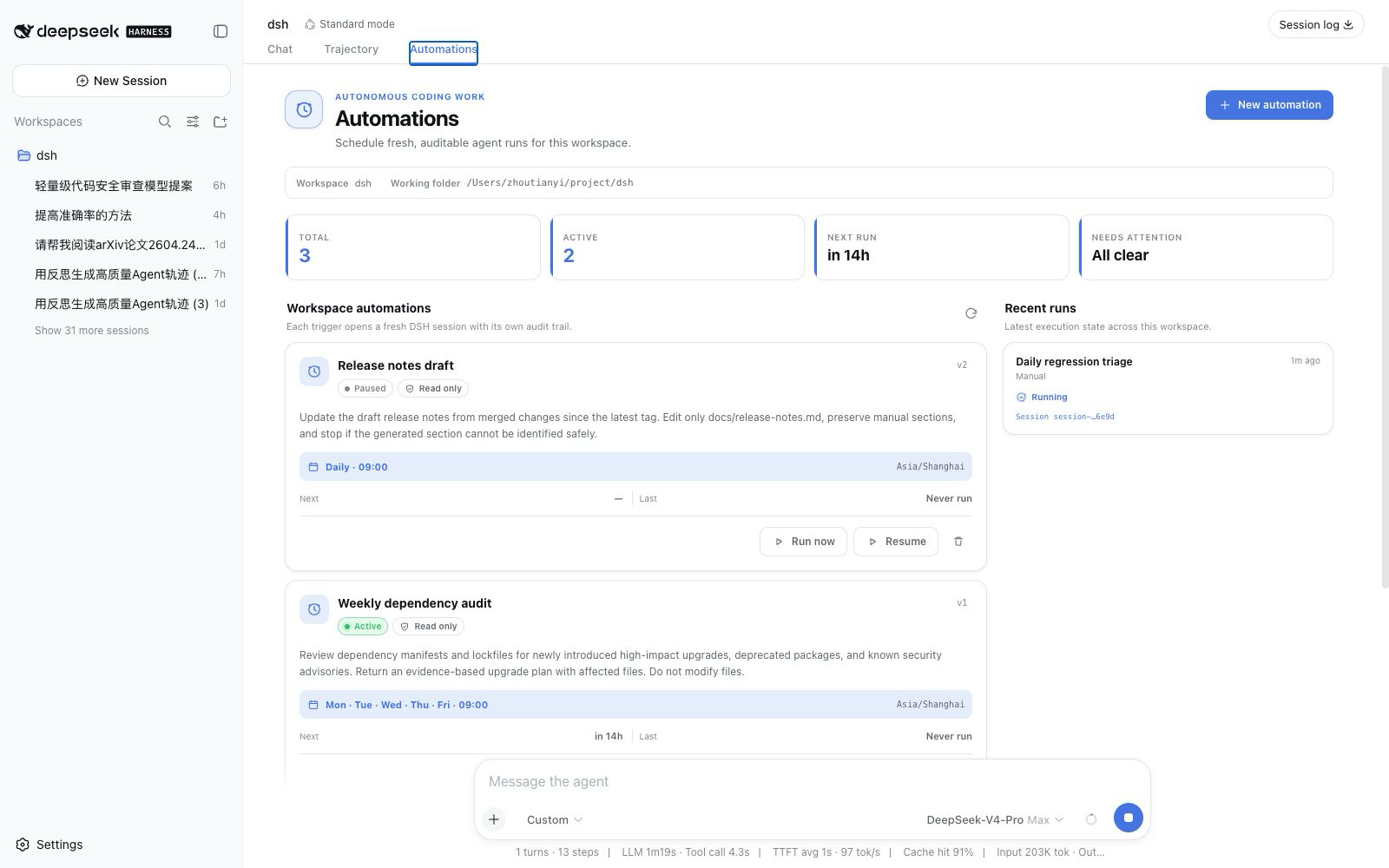
- DSH Web: use the Automations conversation tab to create a rule, pause or resume it, run it now, delete it, and inspect recent runs.
- Any eligible root Agent: ask in natural language. Six scoped tools let the Agent manage automations only for its exact workspace.
There is no separate bot, daemon UI, or third-party scheduler to operate.
📅 Schedules people can read
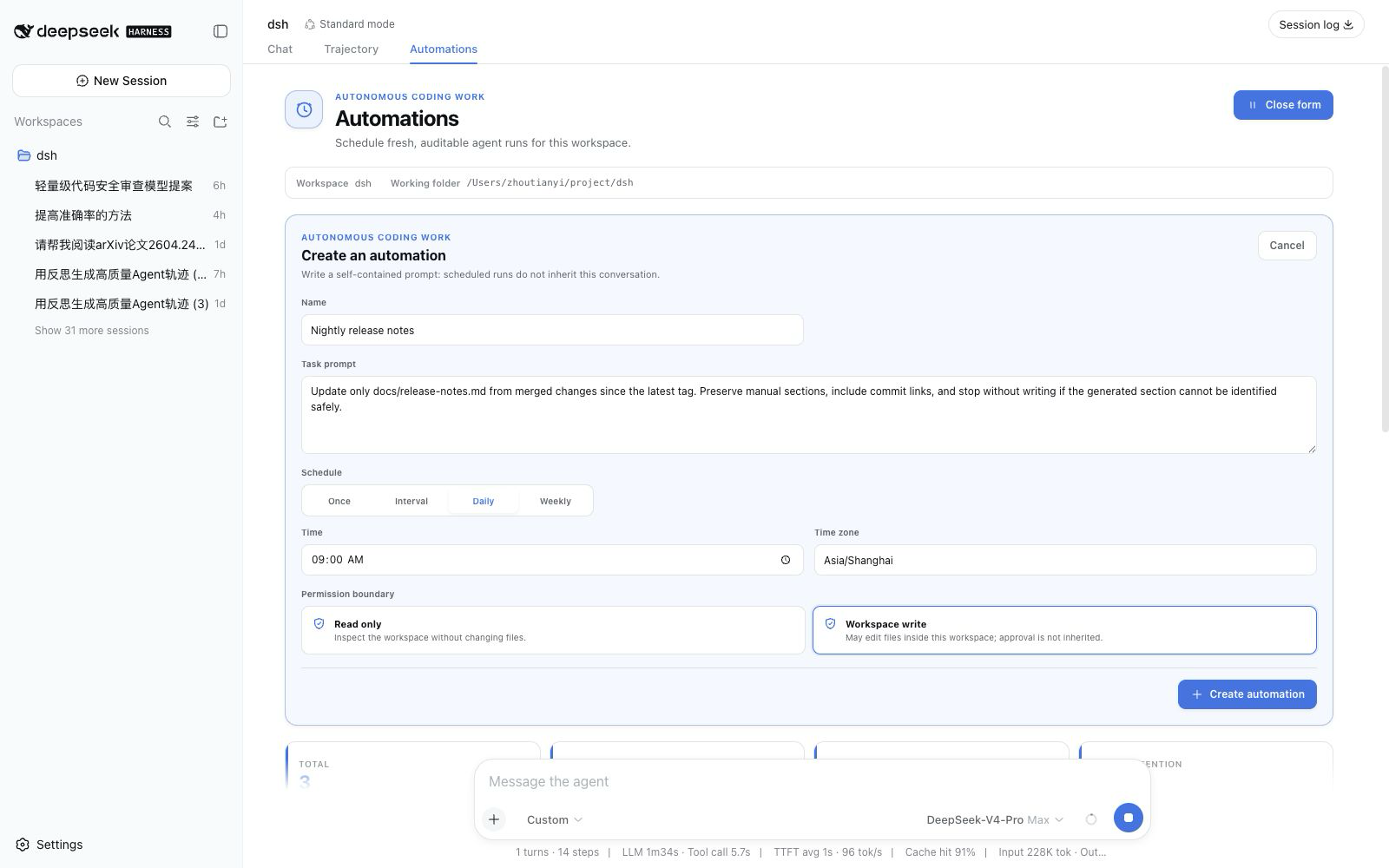
Create a one-shot, fixed-interval, daily, or weekly rule. Daily and weekly schedules use an IANA time zone; the friendly form is normalized into a validated RFC 5545 RRULE for persistence and inspection.
🧼 A clean execution boundary every time
Each dispatched occurrence receives:
- a new Session ID and fresh root Agent;
- the saved prompt, not the source conversation history;
- the captured workspace, cwd, Agent preset, model target, and permission preset;
- an explicit
automationmessage source containing the automation ID, run ID, and scheduled time; - a terminal result derived from the actual DSH turn end, not merely “message delivered.”
🧾 History that explains failure as well as success
Runs progress through queued, running, and a terminal state such as succeeded, failed, skipped, or cancelled. Each record keeps its definition revision, prompt and target snapshot, scheduled time, result Session ID, bounded summary, and structured error.
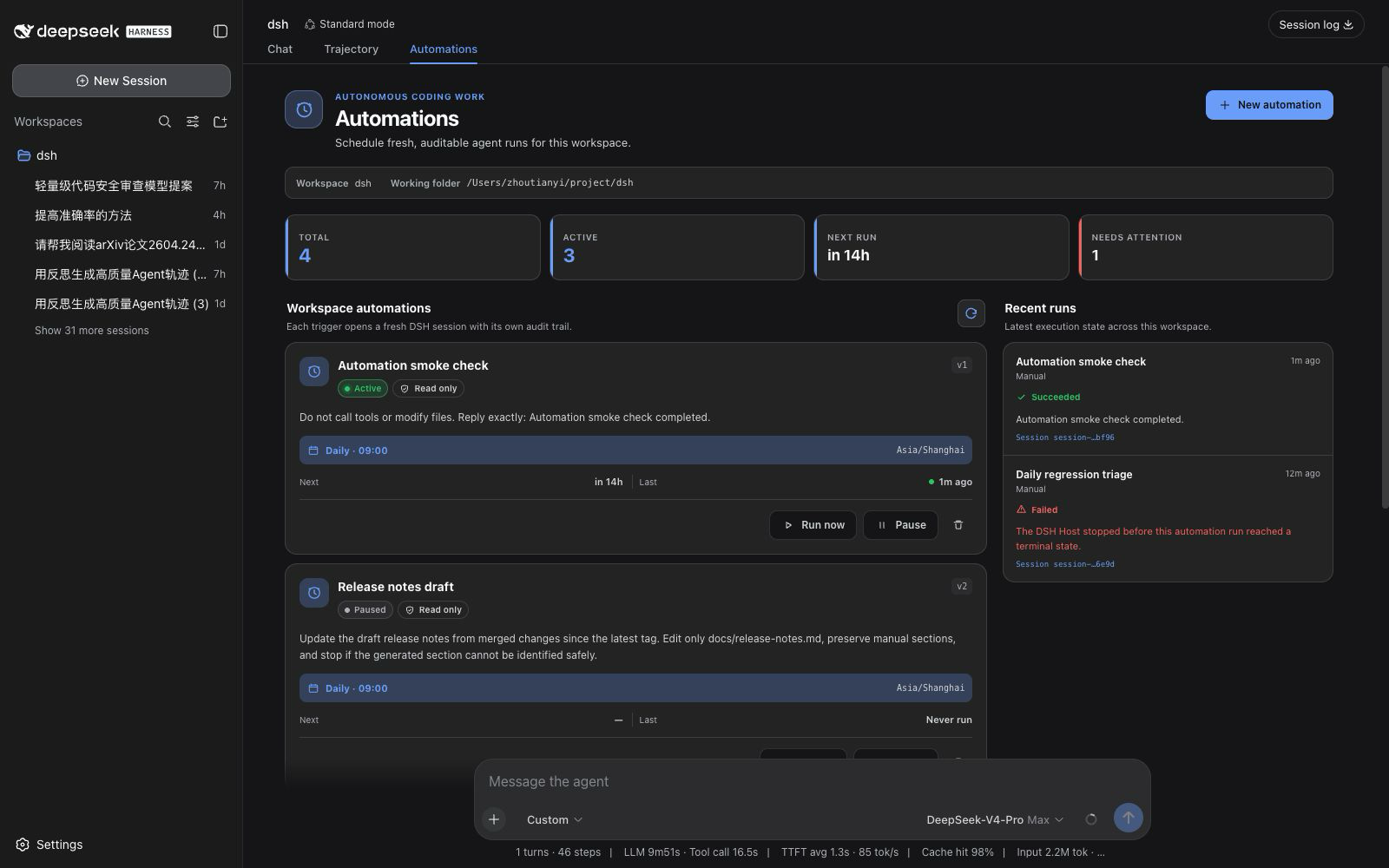
Updating a definition increments its revision, so each retained run still identifies what it executed. Deleting the definition does not immediately erase those run records. Retention removes only the oldest terminal records; queued and running records are never pruned.
⚡ Install
Install the GitHub bundle into the DSH Web profile, then restart dsh web:
dsh plugin --profile web add github:titanwings/dsh-automation#v0.1.2
The version tag keeps the install reproducible; a reviewed commit SHA is equally valid. If you run DSH from its source checkout, use pnpm dsh in place of dsh.
Install from a local checkout
Node.js 22.19 or newer is required.
git clone https://github.com/titanwings/dsh-automation.git
cd dsh-automation
pnpm install
pnpm check

cd /path/to/deepseek-harness
pnpm dsh plugin --profile web add /absolute/path/to/dsh-automation
The repository ships its built Host and Web bundles. Git installation runs no
package build script and needs no allowBuilds entry.
🚀 Quick start
🖥️ From DSH Web
- Open a Session attached to the workspace you want to automate.
- Select Automations next to Chat and Trajectory.
- Enter a self-contained task, schedule, IANA time zone, and permission boundary.
- Use Run now once before relying on the schedule; inspect the resulting Session and run record.
💬 Ask an Agent
Once installed, eligible root Agents receive the management tools. For example:
Create a read-only automation called "Weekday regression triage" for this workspace.
Run it Monday through Friday at 09:30 in Asia/Shanghai. Inspect the latest local test
evidence, identify regressions, and return a short report. Do not modify files.
| Tool | Purpose |
|---|---|
automation_create | Create a workspace-bound standalone rule. |
automation_list | Read rules, next occurrences, and recent history. |
automation_update | Change name, prompt, cadence, permission, or active/paused state. |
automation_run_now | Queue one manual occurrence with the same boundary. |
automation_runs | Read bounded run history, errors, summaries, and Session IDs. |
automation_delete | Delete the definition while retaining durable run records. |
Plugin-level approval asks for human confirmation when an Agent creates or expands unattended future work. Read operations and a pause-only update do not add that extra approval step.
🧰 Good automation candidates
The best automations are repeatable, bounded, and easy to verify.
| Automation | Suggested boundary | Why it is useful |
|---|---|---|
| Weekday regression triage | read-only | Inspect local test evidence, group failures, and leave a concise diagnosis in a new Session. |
| Weekly repository health report | read-only | Review stale TODOs, dependency manifests, ignored failures, and test gaps without changing the tree. |
| One-shot verification | read-only | Recheck a flaky failure later and preserve evidence outside the current chat. |
| Generated-code refresh | workspace-write | Rebuild a known generated artifact, run focused checks, and report the exact diff. |
| Maintenance fix window | workspace-write | Reproduce one bounded issue, make the smallest verified fix, and stop when acceptance checks pass. |
A strong task states the goal, evidence to inspect, allowed changes, verification, and stopping condition. Avoid prompts such as “continue what we discussed” or “fix everything”: scheduled runs do not inherit the conversation that created them.
🛡️ A schedule is not permission
Unattended coding needs a smaller trust boundary than an interactive chat. dsh-automation makes these constraints explicit:
- No inherited authority. A run receives no source-chat history, inbox, grant, or past approval.
- Two permission modes only. Rules may use
read-onlyorworkspace-write; unattendeddanger-full-accessis not accepted. - Fail closed. Each fresh Session uses approval policy
never. A tool that still requires interactive approval fails instead of waiting forever or silently escalating. - Exact workspace scope. Agent tools bind to the caller's canonical registered workspace; callers cannot supply an arbitrary target path.
- Explicit capability allowlist. The fresh Agent admits a small coding-tool set. Interactive questions, plans, goals, nested Agents, runtime plugin mounting, terminal/background jobs, recursive automation management, and unknown third-party tools are denied by an Agent-scoped final guard.
- Loopback Web control. The management RPC channel accepts loopback authority only.
- Traceable origin. The task enters the Session with
source.kind = automation, plus the automation/run identity and scheduled time. It never impersonates a human message. - No blind retries. Once an Agent may have produced side effects, the plugin does not automatically retry it.
These boundaries do not turn every third-party DSH tool into a sandbox. Foreground shell and network behavior still depends on the selected Agent preset, tool set, and DSH guards. Review a task with Run now before enabling unattended writes.
🔧 Technical details
⏱️ Scheduling and recovery semantics
| Situation | Behavior |
|---|---|
| Interval | Minimum five minutes; the first run occurs after one full interval, not immediately. |
| Daily / weekly | Evaluated at local HH:mm in an explicit IANA zone; nonexistent DST wall times are skipped rather than shifted. |
| Overlap | One active run per automation. A due occurrence is recorded as skipped(overlap) if its previous run is queued or running. |
| Host restarts late | Within the grace window (15 minutes by default), only the latest due occurrence can catch up. Older work is not replayed as a write backlog. |
| Run timeout | The Agent is cancelled after 60 minutes by default and the run is recorded as failed. |
| Host crash | Persisted queued or running records become failed(host_interrupted) on recovery; they are not secretly re-executed. |
| Retry | Manual Run now only. There is no automatic side-effect retry. |
A deterministic occurrence key prevents the scheduler from dispatching the same recorded occurrence twice. This is an at-most-once dispatch policy, not a claim that external side effects are exactly once.
The DSH Host must be running for a task to start. Version 0.1 is not an operating-system daemon and does not coordinate multiple Hosts over one storage directory.
🏗️ Architecture
The product model is inspired by Codex Scheduled tasks, especially the distinction between returning to a chat and starting a standalone run. The implementation is native to DSH and Cordis; it does not copy Codex internals or patch DSH Core.
flowchart LR
  UI["Web control center"] --> Service["Automation service"]
  Tools["Agent-scoped tools"] --> Service
  Service --> Definitions["Durable definitions"]
  Clock["Cordis-owned clock"] --> Claim["Durable occurrence claim"]
  Definitions --> Clock
  Claim --> Executor["Run executor"]
  Executor --> Agent["Fresh root Agent + Session"]
  Agent --> Runs["Durable run history"]
  Runs --> Service
| Layer | Owns | Does not own |
|---|---|---|
| Definition/run store | Durable facts and revision snapshots | Timers or Agents |
| Clock | Finding the next due occurrence | Prompts, permissions, or execution |
| Executor | One already-claimed fresh Agent run | Schedule mutation |
| Agent tools / Web RPC | Validated service calls | Tables, timers, or direct Agent construction |
| Web client | Native conversation.view presentation | Authoritative due state |
Cordis disposal stops the clock, cancels plugin-owned live handles, removes tools/RPC/UI, and closes storage without inventing a successful run. The full rationale and data model are in the design document.
⚙️ Configuration
The included cordis.patch.yml uses conservative defaults:
| Option | Default | Meaning |
|---|---|---|
maxConcurrentRuns | 2 | Global execution capacity for this Host. Per-automation overlap is still disabled. |
runTimeoutMinutes | 60 | Maximum wall-clock time for one fresh Agent run. |
misfireGraceMinutes | 15 | How late the latest due occurrence may catch up after downtime. |
historyLimit | 200 | Durable terminal-run retention per automation; active records are always kept. |
Edit the plugin row in the deployment profile if you need different values. Increasing concurrency or timeout expands the amount of unattended work; treat those changes as policy decisions.
🚧 Current limits
Version 0.1 deliberately does not provide:
- same-chat heartbeats — use DSH Core Schedule;
- raw cron or arbitrary shell actions;
- unattended full access;
- automatic retry of a run that may have side effects;
- Git worktree creation or cleanup;
- multi-workspace targets, DAGs, or hidden cross-run memory;
- external email, SMS, or push delivery;
- a guarantee of exactly-once external side effects.
Only local execution is implemented. A stable DSH worktree lifecycle service should exist before a UI toggle claims worktree isolation.
🧪 Development
pnpm typecheck
pnpm test
pnpm build
# or all three
pnpm check
The package builds a Host ESM bundle and a Web client bundle for DSH's window.__ModuleLoader__ contract. Tests cover recurrence and DST behavior, durable-domain invariants, Agent capability guards, scheduler overlap/recovery/retention, and client schedule/localization helpers.
📄 License
MIT. This is an independent community plugin for DeepSeek Harness. “Codex” is referenced only to describe the product pattern that informed the design.
Related DeepSeek Harness Plugins
Browse Automation →
DSHDesktop:DeepSeek Harness Desktop / DeepSeek Harness 桌面版

Agent OS: the agent gets smarter on its own. We just hold the line: Interview-gated, staged evaluation, budgeted evolution loop. MCP server, 14 runtimes: Claude Code, Codex CLI, Gemini CLI, OpenCode, Copilot, Kiro and more.

开放的侧边栏底座,支持三方拓展注册新侧边栏页面。内置文件渲染编辑/终端/侧边对话/Git/子代理页面 | Open sidebar foundation, supports third-party extensions to register new sidebar pages. Built-in file rendering/editing, terminal, side chat, Git, and sub-agent pages.

DSH 官方公众号收录的 TUI 补位插件:鲸鱼顶栏/实时状态/流式思考/双击 Esc 回滚/上下文进度+TPS。npm 一键装。 DSH official WeChat featured TUI plugin — whale bar, live status, streaming thoughts, double-Esc rollback, context bar + TPS. npm one-click.