

DSH Overdrive
☆ 0The OpenClaw of DeepSeek Harness — turn DSH into a multi-platform chat agent with in-chat trajectory tracing, subagents & cron, and one-command deploy.
Get this plugin
Review the source, then continue to the publisher.
About this plugin
Source snapshot 8/17/2026⚡ dsh-overdrive
The OpenClaw of DeepSeek Harness — turn DSH into the chat agent you can see thinking, ready in one command.
English | 中文
dsh-overdrive is the Hermes Agent / OpenClaw alternative built on DeepSeek Harness — bridging into WhatsApp · Telegram · Discord · Slack · 飞书 · 钉钉 · 企业微信, with the difference they don't have: every thought and tool call is visible inside the chat, and dangerous operations always wait for your tap.





Why not just OpenClaw?
Hermes / OpenClaw give you a terminal agent behind 20+ chat channels — but it's a black box. You see the answer, not the work.
DSH's append-only session log is the one thing they can't copy. dsh-overdrive makes that power chat-native:
- 🧠 See it think —
/tracereplays the agent's full reasoning & tool-call trajectory as a summary card, right in the chat - 🤖 Command a team —
/taskspawns parallel subagents,/cron 0 9 * * * …schedules recurring jobs on a built-in scheduler - 🔒 You approve the dangerous stuff — a risky tool call pauses until you tap ✅ Approve / 🚫 Reject (native buttons on Telegram / Discord / Slack / WhatsApp)
- 🚀 One command to deploy —
docker compose up, scan a QR, start chatting. No public URL needed for most platforms.
What it looks like
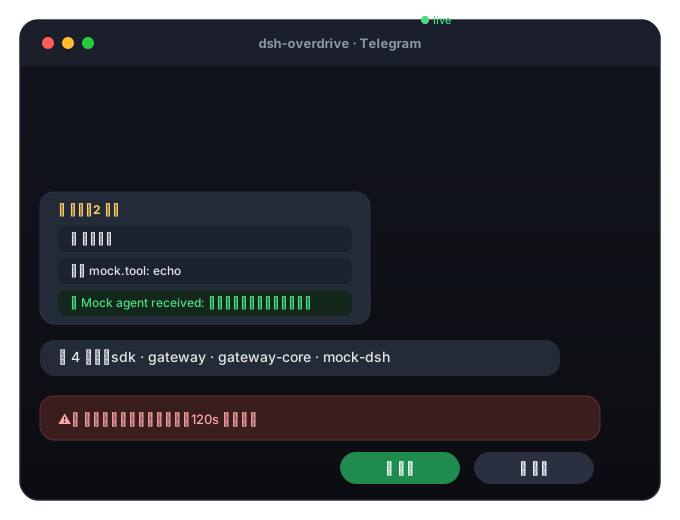
As plain text / 纯文本版
You:  帮我看看这个项目有多少个包
Agent:
       📋 Trajectory (2 steps)
       🧠 Analyzing message
       🛠️ mock.tool: echo
       ✅ Mock agent received: 帮我看看这个项目有多少个包

You:  /task 写一句营销口号
Agent:
       🤖 Subagent spawned
       ✅ Task done 5c399346…

You:  /cron 0 9 * * * 每天给我一条技术新闻
Agent:
       ⏰ Cron job registered

You:  dangerous rm -rf /
Agent:
       ⚠️ Approval required: run dangerous operation (valid 120s)
       [✅ Approve] [🚫 Reject]   ← one tap, the agent continues or stops
🎬 Full demo script → docs/demo.md
Follow the 3-minute script in docs/demo.md: chat → /trace replay → /task subagent → /cron schedule → approval tap → wrap-up.
Supported platforms
| Platform | Integration | Status |
|---|---|---|
| Telegram | Bot API (long-polling) | ✅ verified on real DSH (2026-08-16) |
| Baileys + QR pairing, native interactive buttons | ✅ | |
| Discord | Bot token, native buttons | ✅ |
| Slack | Socket Mode (no public URL) | ✅ |
| 飞书 Feishu | Official SDK, WS long-connection | ✅ |
| 钉钉 DingTalk | Stream mode (WebSocket, no public URL) | ✅ |
| 企业微信 WeCom | Callback API (AES) | ✅ |
| CLI | stdin/stdout (dev & E2E) | ✅ |
Quick start
Docker — one command (recommended):
git clone https://github.com/temotee2103/dsh-overdrive && cd dsh-overdrive
cp deploy/.env.example .env        # fill DEEPSEEK_API_KEY + TELEGRAM_BOT_TOKEN
docker compose -f deploy/docker-compose.yml up -d --build
# Console http://localhost:3190/   DSH Web UI http://localhost:3080/
Already running DSH? One line:
npx dsh-overdrive-setup        # guided setup: API key + platform tokens (verified live)
dsh plugin --profile web add @dsh-overdrive/gateway-core   # plugin
npx dsh-overdrive-gateway                                   # gateway
First message to your bot? Run /help inside the chat. Full options: docs/quickstart.md
Don't code? Do this.
No terminal skills needed. dsh-overdrive is designed to be installed by one person, used by everyone.
-
Ask a tech-savvy friend for 10 minutes
-
Send them this:
macOS / Linux:
curl -fsSL https://raw.githubusercontent.com/temotee2103/dsh-overdrive/main/install.sh | bashWindows: download install.ps1, right-click → "Run with PowerShell" (or double-click)
-
The installer asks 3 questions (API key → platform → bot token) and starts everything for you
-
From then on you just chat: send messages,
/helpfor commands, tap ✅ Approve / 🚫 Reject for dangerous actions
中文:不需要会写代码。找懂行的朋友花 10 分钟装好,之后你只需要聊天:发消息、
/help、危险操作点【同意/拒绝】。
Chat commands
| Command | What it does |
|---|---|
/help | List commands |
/trace | Replay the latest turn's trajectory (thoughts + tool calls) |
/task <prompt> | Spawn a subagent |
/cron <min hour dom mon dow> <prompt> | Schedule a recurring job (built-in 5-field scheduler) |
/agents | Subagent status (simplified) |
/new | Reset the conversation |
Architecture
flowchart LR
    subgraph PLAT["Your chat apps"]
      WA[WhatsApp] & TG[Telegram] & DC[Discord] & SL[Slack]
      FS[飞书] & DT[钉钉] & WM[企业微信]
    end
    subgraph GW["dsh-overdrive gateway (Node process)"]
      AD[Platform Adapters] --> CORE[Session Map · Allowlist · Commands · Trajectory Cards]
    end
    subgraph DSH["DeepSeek Harness (docker)"]
      PLUGIN[gateway-core plugin] --> AG[DSH Agent]
      AG --> LLM[DeepSeek / any model]
      AG --> TOOLS[Tools · Sandbox]
    end
    PLAT <-->|Remote Session Driver / HTTP+WS+token| GW
    GW <-->|protocol| PLUGIN
    AG -. session/event .-> PLUGIN
packages/gateway-core is a DSH plugin (dsh.bundle.patch ready) exposing a Remote Session Driver API; packages/gateway is a standalone multi-platform gateway. The "soul" — trajectory, approval, multi-agent — lives in the plugin, so the narrative survives plugin-API churn.
Development
npm install
npm run build
npx vitest run     # 128+ unit tests
npm run e2e        # full-stack mock E2E (message / approval / allowlist)
Docs
- 📦 Quick start · 🎬 Demo script · 📣 Launch plan · 📤 npm publishing
- 🧪 Platform acceptance checklist
- 📐 Design spec · 🔭 DSH interface research
Roadmap
- M1–M2b: protocol, real DSH bridge, international platforms
- M3: 飞书 / 钉钉 / 企业微信
- M4: trajectory cards,
/task/cron, streaming typing, media, WhatsApp native buttons - M5: docker-compose, web console, MIT + CI, npm distribution
- v0.2: personal WeChat (experimental), ASR voice transcription, Feishu/DingTalk native cards
License
MIT © dsh-overdrive contributors
Related DeepSeek Harness Plugins
Browse Automation →
Self-evolving Context Database for AI Agents. Unify Agent Memory, Knowledge RAG and Skills.

将冰冷的离别化为温暖的 Skill,欢迎加入数字生命1.0!Transforming cold farewells into warm skills? It's giving rebirth era. Welcome to Digital Life 1.0. 🫶

Agent OS: the agent gets smarter on its own. We just hold the line: the grading command and expected result never make it into the success contract we hand it. Interview-gated, staged evaluation, budgeted evolution loop. MCP server, 13 runtimes: Claude Code, Codex CLI, Gemini CLI, OpenCode, Copilot, Kiro and more.

Two-phase DeepSeek Harness preset: Minimal-aligned bootstrap, then full Standard tools (Project2 98/99)