

mermaid2aichat-dsh
☆ 0Mermaid 可视化编辑器 · DeepSeek Harness (dsh) 浏览器插件:右侧可关闭面板,画布与 Mermaid 代码双向同步,AI 工具通道自动导入(flowchart / sequenceDiagram / classDiagram / erDiagram)
Get this plugin
Review the source, then continue to the publisher.
dsh plugin --profile web add mermaid2aichat-dshAbout this plugin
Source snapshot 8/18/2026mermaid2aichat-dsh
Mermaid visual editor — a DeepSeek Harness (dsh) browser plugin. A closable right-side panel that keeps the canvas and the Mermaid code in sync, and works directly with the agent.
中文 · GitHub · npm
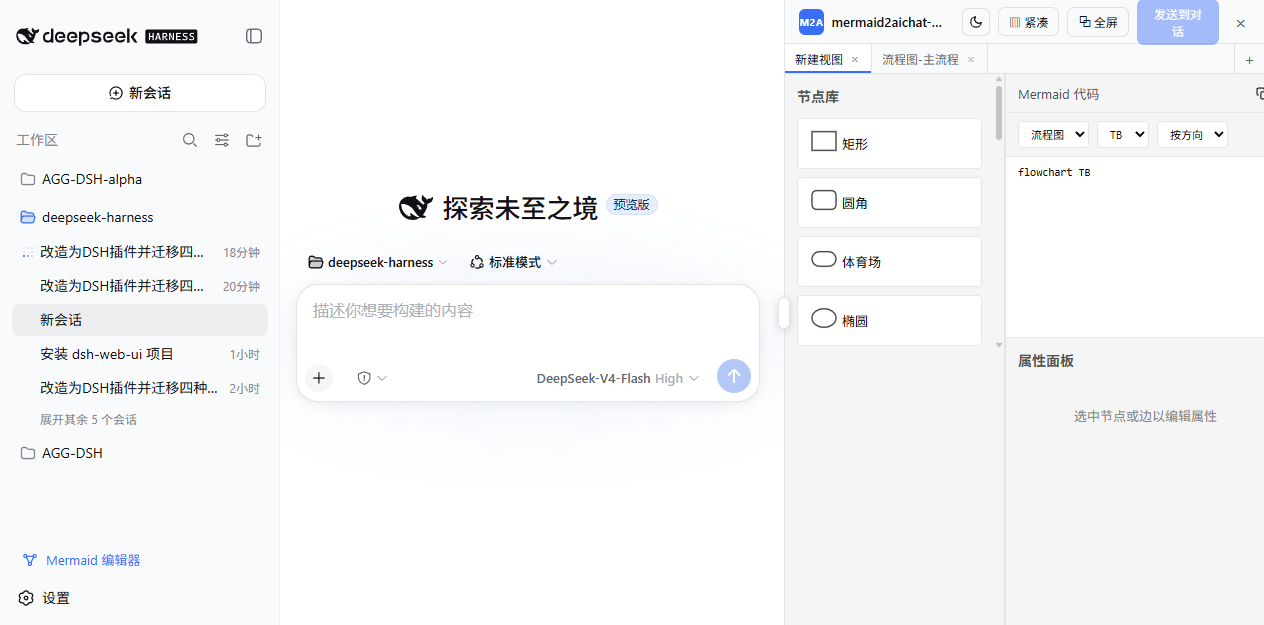
Supports four diagram types: flowchart, sequenceDiagram, classDiagram, erDiagram. The editor UI is the core — no MCP, no server, no VS Code extension; the plugin talks to dsh directly and touches zero dsh source code.
Features
Panel & layout
- Toggle from the "Mermaid 编辑器" button at the bottom of the sidebar; in-page fullscreen (⧉) when the canvas needs room
- Chat area yields + resizable width: a DOM layout controller appends an editor column to the shell grid — the chat auto-shrinks and is never occluded; drag the handle to resize (300–1200px, chat always keeps ≥400px), double-click to reset
- Coexists with the dsh sidebar, the session details column, and dsh-web-ui's right panels (see "Coexistence protocol")
- Responsive compact mode: below 420px the side panels hide, leaving only the canvas; "▥ 紧凑" toggles it manually
- Independent dark mode (title-bar toggle, panel-scoped only)
Editor
- Two-way sync between the visual canvas and the Mermaid code (canvas edits → code; code edits → canvas, committed on blur or Ctrl+Enter)
- Diagram type switcher lives in the code section (flowchart / sequenceDiagram / classDiagram / erDiagram) with a confirm dialog, plus flowchart direction (TB/TD/BT/RL/LR) and connection mode (按方向/就近) selects and a copy-to-clipboard button
- Node library drag-and-drop, connections, property panel, and dedicated editors for subgraphs / namespaces / entities / participants
- Session isolation + multi-tabs: the panel follows the current session, tabs are stored per session; create / switch / close (confirm dialog) / rename on double-click / drag to reorder; each tab owns its canvas, code and viewport
- Canvas and code persist to localStorage and restore on reload
Working with the agent (two-way Mermaid transfer)
- AI → editor: registers the model tool
mermaid_load(host-global layer, no preset change) — when the AI calls it, the diagram is auto-imported as a new tab and the panel opens to show it - Conversation → editor: scans the current session for
```mermaidblocks (AI messages, user messages, tool results); the sidebar badge shows unseen count, and "从对话导入" parses one into a new tab - Editor → conversation: "发送到对话" sends the active tab's code into the current session
- Input-box reference: type
/and the "mermaid" group lists the current session's tabs — pick one to insert its code block into the draft
Install
Option 1: npm (recommended)
dsh plugin --profile web add mermaid2aichat-dsh
Option 2: GitHub
dsh plugin --profile web add github:supergameboy/mermaid2aichat-dsh
Option 3: local directory (development)
dsh plugin --profile web add <path-to-this-repo>
lib/build artifacts are committed, so git/npm installs work without a build step. If pnpm blocks the build, allow the package in$DSH_HOME/profiles/web/pnpm-workspace.yaml(allowBuilds) or use option 1.
After installing, restart dsh web (the mermaid_load tool registers at host startup), then refresh the page — the "Mermaid 编辑器" button appears at the bottom of the sidebar.
Recommended setup: working with archify & dsh-web-ui
Positioning
The value of mermaid2aichat-dsh is not "one more diagram tool" — it turns diagrams into an editable loop that feeds the agent:
AI analyzes / draws ──mermaid_load──▶ editor (editable) ──send to chat──▶ AI continues
user draws / edits ──editor──▶ Mermaid code ──send to chat──▶ AI analyzes / implements from the diagram
One-shot generators such as archify own the "analysis + polished HTML artifact" end; this plugin owns the "Mermaid workbench + two-way agent feed" end. The two complement each other without overlap.
Recommended installs
# this plugin (npm)
dsh plugin --profile web add mermaid2aichat-dsh

# dsh-web-ui family (right-side file tree / preview / task board, coexists on the same grid)
dsh plugin --profile web add @linxin666/dsh-web-ui-all

# archify: an agent skill (Claude Code / npx skills — see its README)
npx skills add tt-a1i/archify -g
How to work with them
- Need a diagram you will keep editing and feed back to the agent (flowchart / sequenceDiagram / classDiagram / erDiagram)? Ask the agent to call
mermaid_loadinto this editor, tweak it, then "发送到对话". - Need a one-shot polished artifact (architecture / data-flow / lifecycle, for docs / PRs / READMEs)? Ask the agent to generate a self-contained HTML with archify.
- Both can coexist in the same session: dsh-web-ui's right panels and this plugin's editor column share the shell grid via the coexistence protocol.
Related projects
- archify — agent skill: natural language to beautiful, self-contained HTML technical diagrams
- dsh-web-ui — a family of dsh plugins (right-side file tree / preview, task board, etc.)
Working with the agent
Tell the agent:
Draw the flow of XXX as a flowchart and send it to the editor.
The agent calls mermaid_load, and the diagram appears in a new editor tab (the panel opens automatically). Adjust it in the editor and click "发送到对话" to send the updated code back; or type / in the input box to reference any tab's code block.
Architecture
One npm package plays three roles:
- bundle (patch layer):
dsh.bundle.patch→cordis.patch.ymlregisters the plugin as adsh.clientrow; - host plugin (Node side): registers the model tool
mermaid_load(global layer, visible to every session's agent); - client plugin (browser side): registers the launcher (
sidebar.footer.action), the panel entry (shell.overlay), the input trigger (inputTriggers) and the DOM layout controller (client/layout.ts).
Data flow (no MCP, no server):
canvas ──onCanvasChange──▶ state.ts (localStorage, per-session)
state ──「发送到对话」──▶ SessionFace.prompt('queue')
mermaid_load tool ──result──▶ blocks source ──▶ auto-import
session ──blocks source──▶「从对话导入」──▶ new tab
input '/' ──trigger「mermaid」──▶ current-session tabs ──▶ insert code block
src/
  index.ts              host half (registers the mermaid_load tool)
  client/               dsh plugin (state, panel, launcher, trigger, block scan, layout controller)
  editor/               editor UI (canvas, node library, property panel, code editor)
  serializer/           parser/serializer (jison parsers + serializers for the 4 types)
cordis.patch.yml        bundle patch layer
lib/                    build artifacts (committed; installs work out of the box)
The editor and serializer are bundled into lib/client.js (@xyflow/react, dagre-cluster-fix, js-yaml inlined; react and friends come from the dsh shell's module table).
Layout & coexistence protocol (no dsh changes needed)
The editor column is a grid track the layout controller appends at the DOM level: it mirrors the shell's inline grid-template-columns (2/3-track tolerant) and appends its own track, fully decoupled from the sidebar, chat and details column — no ctx.layout dependency, no slot shadowing, no host-version requirement.
dsh-web-ui (aionui-panel) uses the same technique for its file-tree/preview panels. When their columns are detected, the controller switches to a cooperative protocol: it writes 6 tracks (shell 3 + editor + their preview + their file tree), keeps the editor column before theirs, re-appends on their 5-track writes in the same frame, nudges with a bare shell 3-track write to converge after their HMR/late attach, and carries a write-burst guard so observer cascades can never freeze the page. Both panels show side by side.
Development
pnpm install      # install dependencies
pnpm run build    # builds lib/index.js (host) + lib/client.js (browser)
pnpm run typecheck
pnpm run watch    # tsdown watch rebuild
After changing source, re-run pnpm run build; host-side changes (tool registration) need a dsh web restart, browser-side changes only a page refresh.
Known limitations
- Only flowchart / sequenceDiagram / classDiagram / erDiagram are supported; parsing other types reports "unsupported"
- "从对话导入" scans only the loaded message window of the current session; older pages need scrolling into view first
- The client bundle is large (React Flow and all editor deps inlined); it is fetched on first panel open
- The
/input-trigger replaces the draft with the code block (setDraftsemantics) and cannot append to existing draft text - Editor column width persists only on drag-end, double-click reset and window resize; sidebar/details toggles affect the current display width only, never the preference (matches dsh's own layout-preference semantics)
Acknowledgments
The DOM layout controller (mirroring the shell's grid, appending its own column track, and drawing custom drag handles) is inspired by the aionui-panel package in dsh-web-ui. Thanks to its author for sharing the approach — this plugin's coexistence protocol is built around that behavior so both can run side by side in the same GUI.
License
MIT
Related DeepSeek Harness Plugins
Browse Developer Tools →
为 DeepSeek Harness (DSH) 插件生态打造的现代化桌面端解决方案。万物皆「插件」,桌面本身也是「插件」。

The plugin market inside DeepSeek Harness — browse, search, one-click install · DSH 可视化插件市场

Whale Girl skin series for DeepSeek Harness. 适用于 DeepSeek Harness 的,鲸鱼娘系列皮肤。

把 DeepSeek Harness 装进你的口袋:电脑上跑 dsh web,手机扫码即同步访问(局域网 + 公网,实时同屏)Put DeepSeek Harness in your pocket: run dsh web on your computer and access it synchronously by scanning a QR code on your phone (LAN + public network, real‑time screen mirroring)