

DSH Webui Market Plugin
☆ 79dsh Web GUI 社区插件市场:浏览 awesome-dsh-plugin.com 插件目录,一键安装/卸载到 profile。Community plugin market for the DeepSeek Harness (dsh) web GUI: browse, install and uninstall plugins into a profile.
Get this plugin
Review the source, then continue to the publisher.
dsh plugin --profile web add @sanqi-normal/dsh-webui-market-pluginAbout this plugin
Source snapshot 8/18/2026dsh-webui-market-plugin
在 dsh web GUI 内部的社区插件市场:浏览 awesome-dsh-plugin.com 的插件目录,直接在 设置 → 插件 → 插件市场 里安装 / 卸载插件到 profile。界面风格与 harness 前端一致(跟随系统深浅色主题),支持中英文(按系统语言自动切换)。
An in-harness community plugin market for the dsh web GUI: browse the awesome-dsh-plugin.com catalog and install/uninstall plugins into a profile from Settings → Plugins → Plugin Market.
效果展示 Screenshot
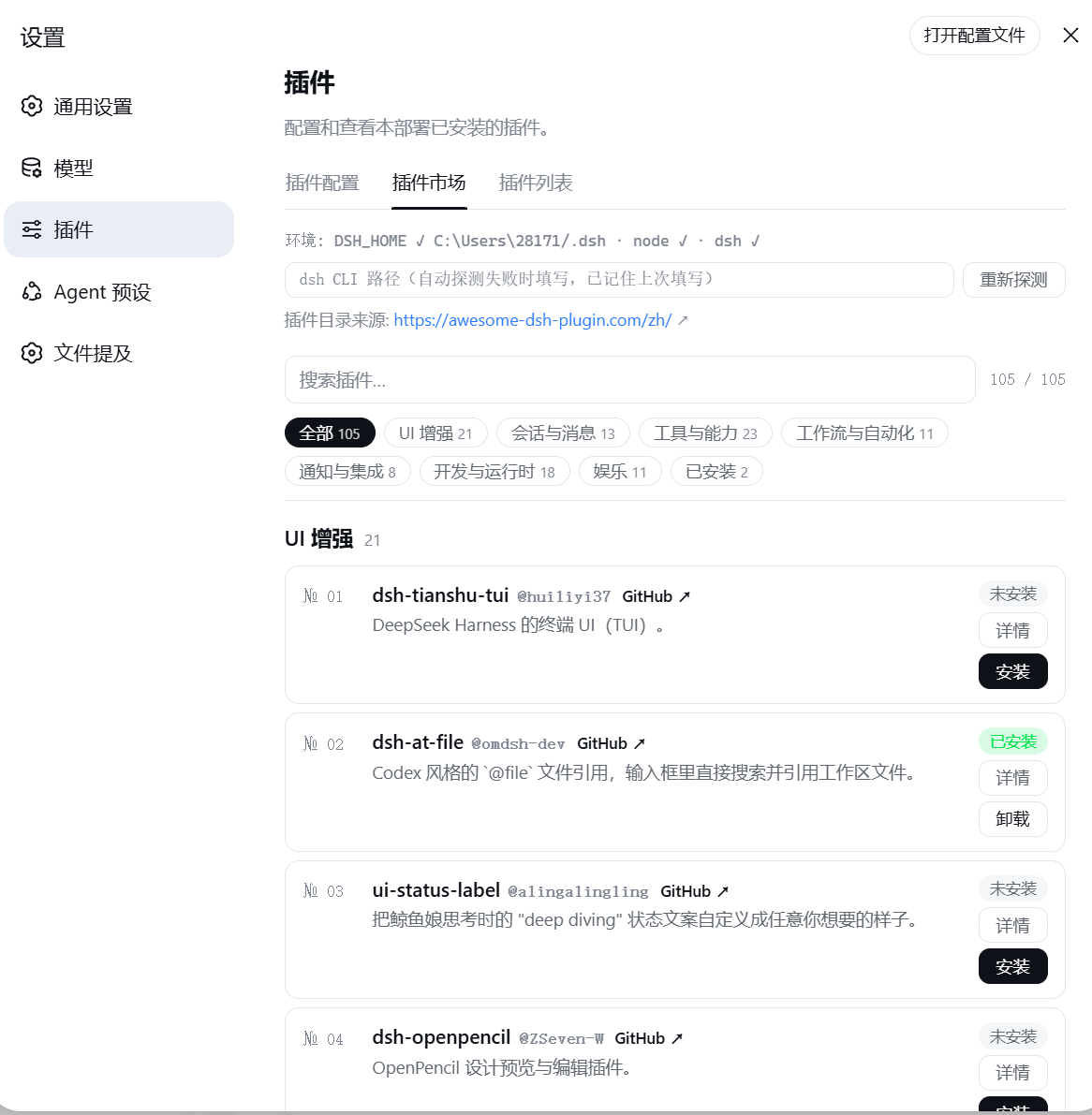
安装 Install
方式一:从 npm registry 安装(推荐,无 git 克隆 / prepare 脚本步骤):
dsh plugin --profile web add @sanqi-normal/dsh-webui-market-plugin
方式二:从 GitHub 源码安装:
dsh plugin --profile web add github:Sanqi-normal/dsh-webui-market-plugin
安装后重启 web 服务生效:
pnpm dsh web
GitHub 源安装会执行包内 prepare 脚本,如被 pnpm 拦截,把提示的包名加入 profile 的 pnpm-workspace.yaml 的 allowBuilds 后重试。
使用 Usage
打开 设置(Settings)→ 插件(Plugins)→ 插件市场(Plugin Market):
- 目录按分类分组,支持搜索与"已安装"过滤
- 点 详情 查看该插件的官方安装命令(含目标 profile)
- 安装 / 卸载 以弹窗形式确认,任务后台执行、实时显示 pnpm 输出,可最小化到后台、随时终止;超过 120 秒自动超时报错
- 每个插件卡片显示真实的已安装状态(与 profile 的
package.json同步) - 顶部显示插件目录来源官网链接,可直接打开
工作原理 How it works
持久化 bundle(package.json 的 dsh.bundle.patch → cordis.patch.yml),由 dsh plugin add 的 reconcile 自动加入 profile 的 dsh.profile.bundles 层:
- Host 半(
lib/host.js):注册/api/dsh-market路由,提供list(抓取并解析官网目录)、probe(环境探测)、installed(读取 profile package.json)、install/uninstall(后台 spawndsh pluginCLI)、op(轮询任务状态)、kill(终止任务) - Client 半(
lib/client.js):通过exports["./client"]+dsh.client声明被 web 前端加载,注册到settings.plugins.tab槽位
安全与限制 Safety and limitations
- 完整应用类插件会被拦截:安装前会抓取 GitHub manifest 分类(raw.githubusercontent.com 失败时自动回退 raw.gitmirror.com),面向其他 profile 的完整应用(如 TUI 客户端,含
@deepseek-ai/dsh-agent等依赖且无 web client 声明)装进 web 会与内置应用冲突导致启动失败(重复 api-gateway),面板会拒绝并给出对应 profile 的安装建议;确认来源可信时也可在确认弹窗勾选"跳过完整应用类型检查"(风险自负) - 安装 / 卸载后需重启 web 服务生效(本插件不做自动重启)
- 目录数据来自官网静态页解析,官网无 JSON API;插件数量与分类以官网为准
开发 Development
本地开发用 link 方式装进 profile:
dsh plugin --profile web add link:C:/绝对路径/dsh-webui-market-plugin
测试:
npm test # node --test tests/*.test.mjs
发布 Publishing
包名 @sanqi-normal/dsh-webui-market-plugin(npm 作用域必须小写;GitHub 仓库为 Sanqi-normal/dsh-webui-market-plugin),repository / homepage / bugs / LICENSE 均已填好。
发布前检查:
npm publish --dry-run确认发布内容只含lib/、cordis.patch.yml、README.md、LICENSE、package.json、img/(README 效果图)- npm 账号需拥有
@sanqi-normal作用域(npm 用户名通常与 GitHub 相同;不一致时先创建同名 npm 账号或改 scope) - 推送 GitHub 后,安装验证:
dsh plugin --profile web add github:Sanqi-normal/dsh-webui-market-plugin;发布 npm 后验证:npm view @sanqi-normal/dsh-webui-market-plugin,registry 安装:dsh plugin --profile web add @sanqi-normal/dsh-webui-market-plugin
包名是本地 profile 中的依赖键:本地改名前需重新
dsh plugin --profile web remove @sanqi-normal/dsh-webui-market-plugin && dsh plugin --profile web add link:本目录(或直接装 GitHub 源)。
Related DeepSeek Harness Plugins
Browse Browser →
DeepSeek Harness (DSH) Web 插件聚合生态 · 万物皆插件,通过创意工坊分发||DeepSeek Harness (DSH) Web Plugin Aggregation Ecosystem · Everything is a plugin, distributed via the Creative Workshop

本地私有、开源的自进化跨平台 AI 内容发现 Agent:先理解你,再主动从 B站、小红书、抖音、YouTube、X、知乎、Reddit、微博等平台与开放 Web 寻找内容。(支持 deepseek harness 插件) | Local-first open-source cross-platform AI content discovery agent: understands you, then proactively finds content across Bilibili, Xiaohongshu, Douyin, YouTube, X, Zhihu, Reddit, Weibo and the open web.(support deepseek harness plugin)

The best DeepSeek Harness plugin for context insight and management, with context dashboard / browser / sidebar and context command, for context statistics, composition, breakdown, evolution details, understanding how the context is made of, and how it evolves. 一站式 DeepSeek Harness 上下文可视化插件,Context 面板及浏览器和侧边栏与 Context 命令,透视上下文组成、演进、压缩、剪枝等事件与动作。

[dsh]为纯文本模型设计更强大的视觉工具箱:一行安装使用、粘贴图片直接识别、多张图片问答、截图到前端UI 还原等|DeepSeek Harness-native integration for agent-vision-toolkit: image Q&A, long-screenshot OCR, UI restoration, grounding, pixel diff, Artifacts, and Web UI.