

DSH Drop In
☆ 5把文件拖入/粘贴到 DeepSeek Harness Web:输入框原生引用气泡,随消息发送(含绝对路径),气泡渲染文件卡片。Drag/paste files into the DeepSeek Harness web GUI as native reference bubbles — absolute paths, file cards.
Get this plugin
Review the source, then continue to the publisher.
dsh plugin --profile web add https://github.com/lbl61/dsh-drop-in/archive/refs/tags/v1.3.0.tar.gzAbout this plugin
Source snapshot 8/18/2026dsh-drop-in
馃寪 涓枃鐗堬細README.zh.md
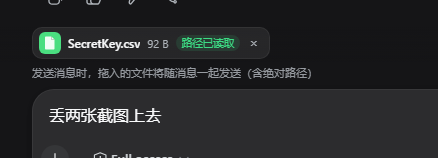
Drag files from your system file manager straight into the DeepSeek Harness web GUI. Files appear as a chip bar above the input box, are sent along with your message (including their absolute paths), and render as pretty file cards inside the message bubble. The agent reads the real file paths 鈥?no upload, no content copy.
Features
- 馃柋锔?Drag any file or folder from the OS into the page (images are treated as files too 鈥?no more "drop images here" mask taking over)
- 馃搶 A chip bar above the composer: icon + name + size + path status, per-file
removal (
脳), deduplicated (same path / name+size+mtime won't be added twice) - 鉁夛笍 When you send the message, the file list is attached automatically as a
馃搸 鎷栧叆鏂囦欢block (name, size, absolute path) 鈥?the bubble renders it as file cards; hover a card to see the full path - 馃敡 A
dropped_filestool so the agent can also list not-yet-sent files - 馃枼锔?Works in the DSH Desktop shell (Electron): absolute paths come from a tiny
preload.jsbridge (webUtils.getPathForFile, the only way in modern Electron) - 馃寪 Fallback: in a plain browser (no preload bridge), small text files are copied
into
.dsh-drops/under the session workspace so the agent can still read them
Install
dsh plugin --profile web add https://github.com/lbl61/dsh-drop-in/archive/refs/tags/v1.1.1.tar.gz
or install the package into the web profile manually (bundle form):
- Unpack
dsh-drop-ininto~/.dsh/profiles/web/node_modules/dsh-drop-in/ - Add
"dsh-drop-in"to thedsh.profile.bundlesarray in~/.dsh/profiles/web/package.json - Restart
dsh web(DSH Desktop: fully quit and reopen, orwindow.dshDesktop.restartService()from the DevTools console)
Usage
- Drag files from Explorer / Finder / Files into the chat page.
- The chip bar above the input box shows what will be attached.
- Type your message and send (Enter or the send button).
- The message bubble shows the files as cards 鈥?the agent receives the absolute paths in the message and can read the files directly with its own tools.
How it works
- The client half intercepts file drags in the capture phase (so the built-in
image-drop flow never hijacks them), keeps a per-session chip bar
(
conversation.input.dock), renders the user message bubble with file cards (conversation.chat.nodekeyuser), and appends the馃搸 鎷栧叆鏂囦欢block to the draft right before submit (both Enter and the send button). - The host half keeps a per-session registry, serves it to the agent through the
dropped_filestool, and (browser fallback) writes text files into.dsh-drops/<sessionId>/. - Absolute paths in the DSH Desktop shell require the preload bridge (see
preload-bridge.md); it is the only way to get real paths in
modern Electron (Electron 鈮?32 removed
File.path).
Configuration
| Setting | Meaning |
|---|---|
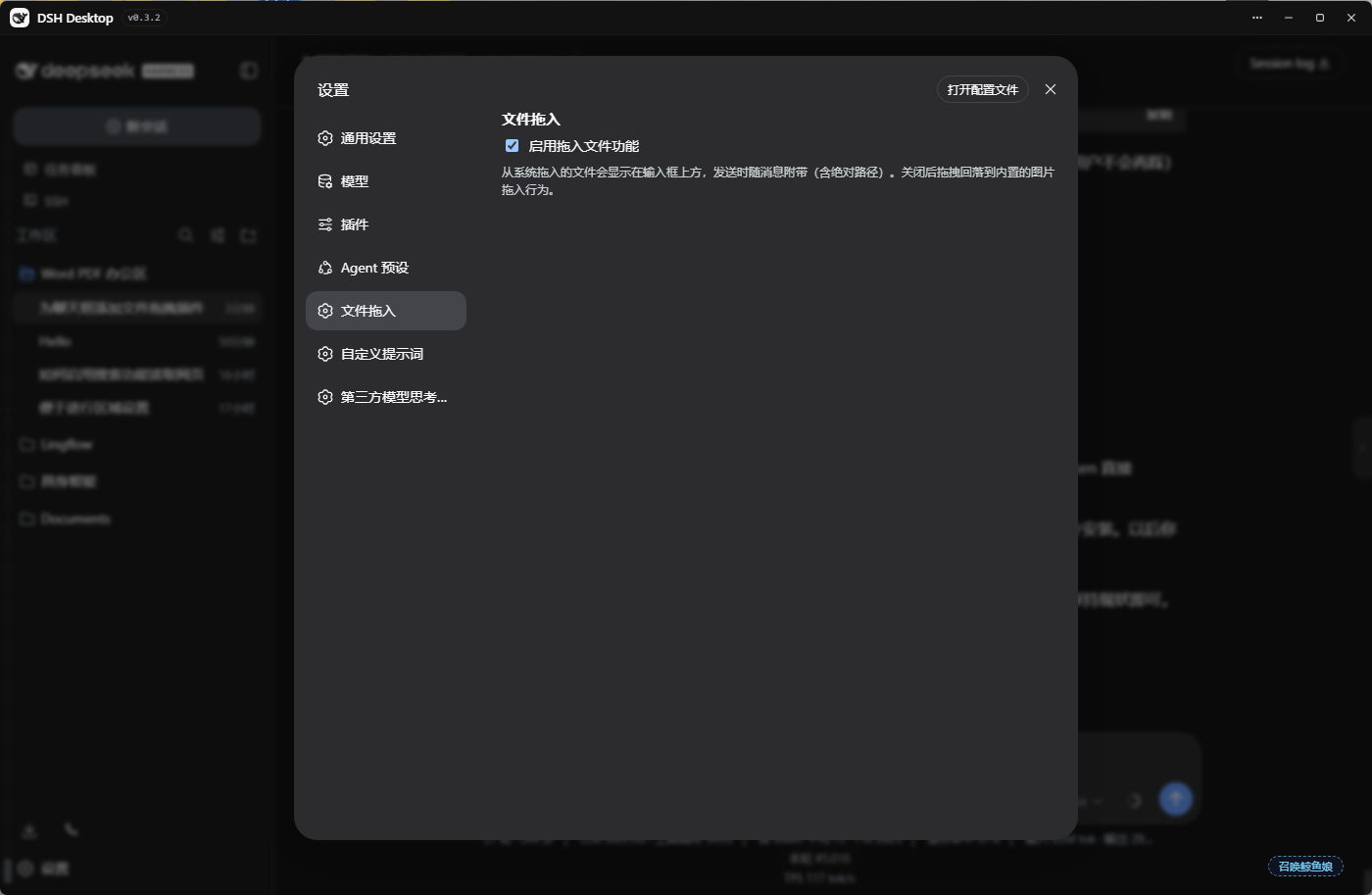
enabled | Master switch (Settings 鈫?鏂囦欢鎷栧叆). When off, drags fall through to the built-in behavior. |
Uninstall
- Remove
dsh-drop-infromdsh.profile.bundlesin~/.dsh/profiles/web/package.json - Delete
~/.dsh/profiles/web/node_modules/dsh-drop-in/ - Restart
dsh web
License
MIT
Related DeepSeek Harness Plugins
Browse Developer Tools →
为 DeepSeek Harness (DSH) 插件生态打造的现代化桌面端解决方案。万物皆「插件」,桌面本身也是「插件」。

The plugin market inside DeepSeek Harness — browse, search, one-click install · DSH 可视化插件市场

Whale Girl skin series for DeepSeek Harness. 适用于 DeepSeek Harness 的,鲸鱼娘系列皮肤。

把 DeepSeek Harness 装进你的口袋:电脑上跑 dsh web,手机扫码即同步访问(局域网 + 公网,实时同屏)Put DeepSeek Harness in your pocket: run dsh web on your computer and access it synchronously by scanning a QR code on your phone (LAN + public network, real‑time screen mirroring)