

deepseek-harness-desktop
☆ 6A desktop shell for DeepSeek Harness — the pluggable AI agent harness from DeepSeek. Wrap the official dsh web UI into a native-feeling, always-on desktop app. / 为 DeepSeek Harness(DeepSeek 开源的可插拔 AI Agent harness)打造的桌面应用壳,把官方 dsh web 界面包装成原生质感、常驻后台的桌面应用。
Get this plugin
Review the source, then continue to the publisher.
dsh plugin add deepseek-harness-desktop@latestAbout this plugin
Source snapshot 8/13/2026

DeepSeek Harness Desktop




A desktop shell for DeepSeek Harness — the pluggable AI agent harness from DeepSeek. Wrap the official dsh web UI into a native-feeling, always-on desktop app.
English | 简体中文
Features
- Zero-intrusion wrapper — spawns
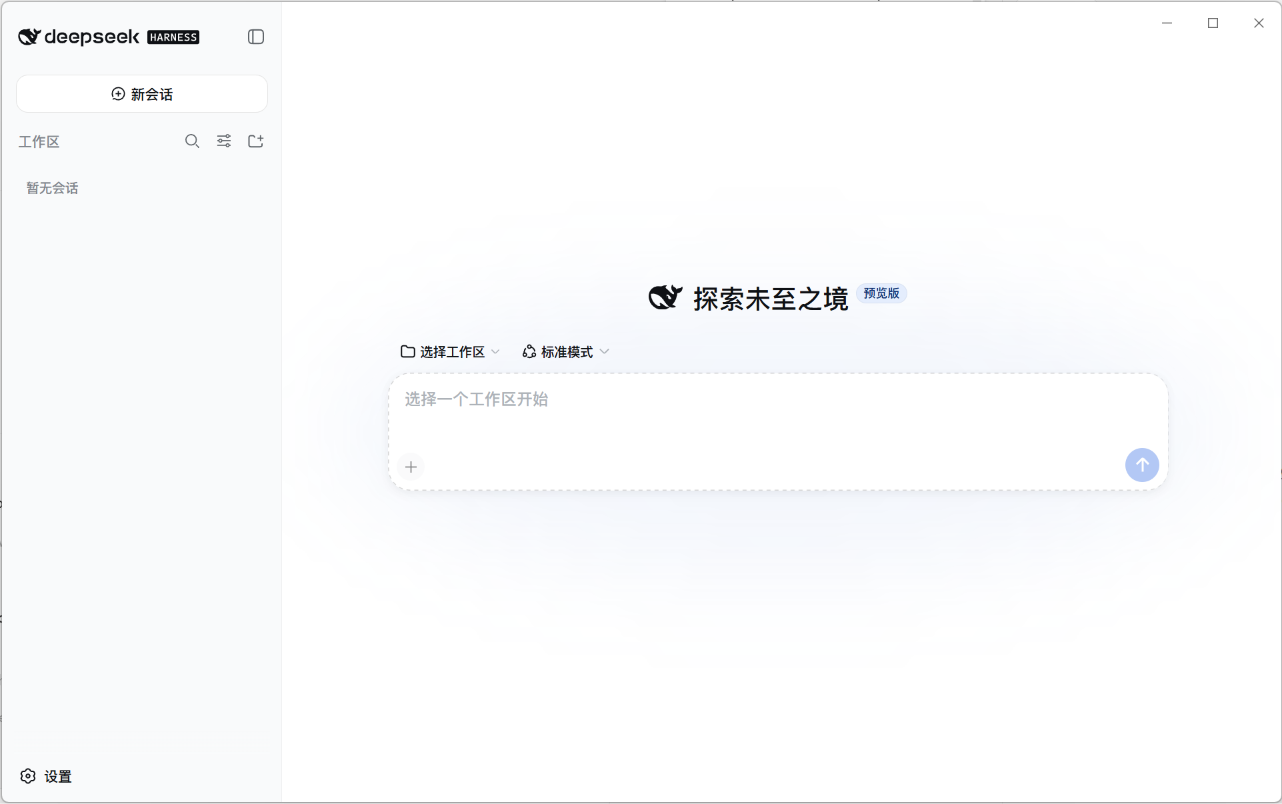
dsh webas a child process (bundled Node 24 +@deepseek-ai/dsh), loads its localhost UI; the harness source is never modified, upgrades are one version bump away - Frameless immersive window — no native title bar; the custom window controls (minimize / maximize / close) blend into the page with DeepSeek brand-blue hover and follow the light/dark theme
- Always-on tray — closing the window hides to the system tray instead of quitting; the backend keeps running for instant resume
- Auto-start at login — toggle in the tray menu (Windows/macOS native; Linux via XDG autostart)
- Port-conflict proof —
--port 0lets the OS pick a free port; the shell discovers the real address from dsh's stdout readiness line - Data isolation —
DSH_HOMEpoints to the app's own data directory; your default~/.dshstays untouched - Single instance — launching again focuses the existing window
- Full plugin freedom — dynamic plugins (
cordis_define/cordis_run),$DSH_HOME/cordis.patch.yml, and the npm plugin ecosystem all work exactly as in the web edition - Desktop settings section — the app's Settings page gains a "Desktop" tab (styled to match the harness UI): auto-start toggle, launch-minimized toggle, About card (version / data / log dirs), and a check-for-updates button — all in sync with the tray menu
- Auto-update — checks silently 15s after launch: Windows downloads and guides you to run the installer (unsigned builds can't install silently); Linux AppImage replaces itself automatically; macOS excluded (needs signing)
Screenshot
Install
Download the installer for your platform from the Releases page:
| Platform | Package | Notes |
|---|---|---|
| Windows | DeepSeek Harness Desktop Setup <ver>.exe | NSIS installer, x64 |
| macOS | .dmg (Apple Silicon / Intel) | unsigned — first run: right-click → Open |
| Linux | .AppImage + .deb | x64 |
First launch
- Start the app — the bundled
dsh webserver boots in the background and the UI opens at its ready state - Dismiss the 预览版 / preview notice
- Open Settings → Models and configure your LLM provider (API key, model, base URL) — same as the web edition
- Pick a workspace and start chatting
Everyday use
- Close window → app hides to the tray, backend keeps running (a DeepSeek whale icon appears near the system clock)
- Tray menu (right-click the icon): reopen the window, toggle auto-start at login, or quit — quitting fully stops the backend
- Quit via tray is the only way to exit the app; closing the window never does
Development
npm install        # installs electron 43 + toolchain
npm run dev        # dev mode: system Node + local node_modules dsh
electron binary download stuck? (you see
Downloading Electron binary...forever) GitHub-hosted binaries can be slow from some networks. Manually fetchhttps://npmmirror.com/mirrors/electron/<version>/electron-v<version>-win32-x64.zipinto%LOCALAPPDATA%\electron\Cache\electron-v<version>-win32-x64\, then:printf "electron.exe" > node_modules/electron/path.txt # and unzip the archive into node_modules/electron/dist/
Packaging
npm run build:runtime     # fills resources/: bundled Node 24 LTS + dsh dependency tree + icons
                          # slow network? HTTPS_PROXY=http://127.0.0.1:8897 npm run build:runtime
npm run dist:win          # Windows NSIS installer → release/
# npm run dist:mac        # macOS dmg (requires macOS; CI builds it)
# npm run dist:linux      # Linux AppImage + deb
The CI workflow (.github/workflows/release.yml) builds all three platforms on every v* tag and publishes the artifacts to a GitHub Release.
Data & logs
- Data (
DSH_HOME):<userData>/dsh— profiles, sessions, storage - Logs:
<userData>/logs/main.log - Runtime (bundled):
<install>/resources/resources/— Node (runtime/node/) + dsh (dsh/node_modules/)
Project layout
src/
  main.ts          app lifecycle: single-instance lock, window, tray, dsh orchestration
  paths.ts         dev/prod resource resolution (bundled dsh, Node, preload, patch)
  settings.ts      shell settings (userData/settings.json — launch-minimized)
  updater.ts       electron-updater (Windows guided / Linux AppImage auto)
  dsh/spawn.ts     spawn dsh web --port 0 --patch; parse stdout URL line; graceful stop
  dsh/ready.ts     HTTP readiness probe
  tray.ts          tray menu (open / auto-start / quit) + autostart sync
  autostart.ts     auto-start (native on win/mac; XDG file on linux)
  preload.ts       contextBridge bridge (window controls + desktop IPC; compiled to CJS)
scripts/
  install-runtime.mjs   fills resources/ at build time (Node dist + dsh tree + icons + platform trim)
  smoke.mjs             headless smoke test: spawn dsh, assert URL line + HTTP 200
resources/
  desktop-integration/  settings "Desktop" section plugin (dsh browser half)
  desktop-patch.yml     shell-injected patch mounting the plugin
assets/
  wordmark.svg          project wordmark
Known limitations (v1)
- Installer ≈ 150 MB+ (bundled Node + full dsh dependency tree); size trimming is on the roadmap
- macOS builds are unsigned — Gatekeeper requires right-click → Open on first run; macOS has no auto-update (needs a signing certificate)
- dsh is in developer preview and iterates fast; the shell pins
@deepseek-ai/dshand upgrades require re-packaging - Windows auto-update is guided (downloads then runs the installer) rather than silent, due to the unsigned build
Feedback
Found a bug? Have a feature idea? Issues are very welcome — bug reports, usage questions, and suggestions all help.
- Open an issue (English or 中文, either is fine)
- For harness-level problems, also check upstream deepseek-harness discussions
License
MIT. The DeepSeek Harness itself is MIT © DeepSeek AI.
Related DeepSeek Harness Plugins
Browse Browser →
DeepSeek Harness (DSH) Web 插件聚合生态 · 万物皆插件,通过创意工坊分发||DeepSeek Harness (DSH) Web Plugin Aggregation Ecosystem · Everything is a plugin, distributed via the Creative Workshop

本地私有、开源的自进化跨平台 AI 内容发现 Agent:先理解你,再主动从 B站、小红书、抖音、YouTube、X、知乎、Reddit、微博等平台与开放 Web 寻找内容。(支持 deepseek harness 插件) | Local-first open-source cross-platform AI content discovery agent: understands you, then proactively finds content across Bilibili, Xiaohongshu, Douyin, YouTube, X, Zhihu, Reddit, Weibo and the open web.(support deepseek harness plugin)

The best DeepSeek Harness plugin for context insight and management, with context dashboard / browser / sidebar and context command, for context statistics, composition, breakdown, evolution details, understanding how the context is made of, and how it evolves. 一站式 DeepSeek Harness 上下文可视化插件,Context 面板及浏览器和侧边栏与 Context 命令,透视上下文组成、演进、压缩、剪枝等事件与动作。

[dsh]为纯文本模型设计更强大的视觉工具箱:一行安装使用、粘贴图片直接识别、多张图片问答、截图到前端UI 还原等|DeepSeek Harness-native integration for agent-vision-toolkit: image Q&A, long-screenshot OCR, UI restoration, grounding, pixel diff, Artifacts, and Web UI.