

DSH Remote
☆ 100Remote-work assistant for DeepSeek Harness (DSH): connect SSH (key or password), pick a remote workspace, operate with rw_* tools, and SFTP-mirror it into a real local DSH workspace.
Get this plugin
Review the source, then continue to the publisher.
dsh plugin --profile web add dsh-remoteAbout this plugin
Source snapshot 8/18/2026dsh-remote
Remote-work assistant for DeepSeek Harness (DSH).
Manage several SSH machines, then pick a remote workspace (or a local one) and let the agent operate right there without leaving the harness — listing files, reading code, running builds & commands over the remote host, and keeping that remote directory mirrored into a real local workspace object.
The harness Web UI intentionally binds 127.0.0.1 (the CLI rejects --host 0.0.0.0 for safety). This plugin goes the other way: you connect out to the machines you maintain, pick a workspace, and work in it through the normal DSH workspace + agent fs flows — no changes to dsh-workspace or the harness core.
Screen previews
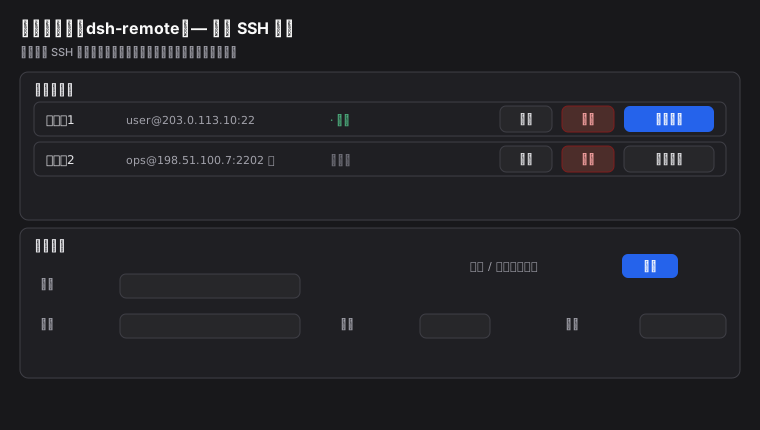
Settings → 远程工作区 — a multi-machine SSH registry (add / edit / delete / set-current, password stored locally):
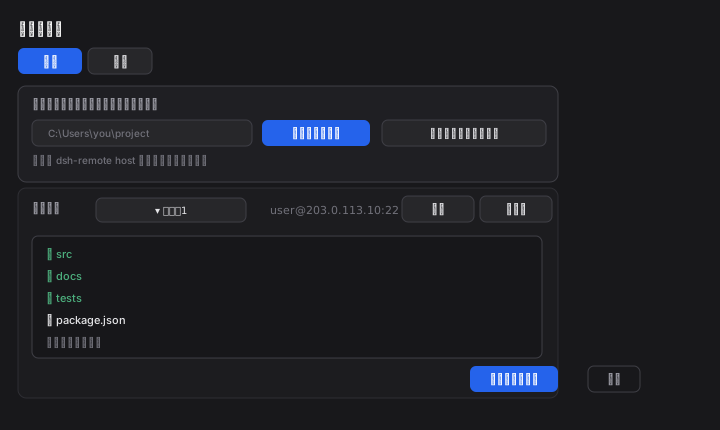
The native "Add workspace" / "Select workspace" flow — one dialog, two tabs (本地 local / 远程 remote):
Features
- Multi-machine SSH — save any number of hosts (
host/port/user+ private key or password). Passwords are stored locally and never shown back in the UI. Switch with one click in Settings. - Two-tab workspace picker (fills the native "Add workspace" flow):
- 本机 / Local — opens the native OS folder chooser over the host, or lets you type a local path → adopted directly as a normal DSH local workspace (local workspaces fully coexist).
- 远程 / Remote — pick a machine, then browse its directories (or type a path) 🡺 on confirm it creates a real local mirror (
~/.dsh/remote-workspaces/<host>/<base>-<hash>) that passesfs.realpath→ the harness adopts it as a real workspace while dsh-remote keeps it synced over SFTP.
- Bidirectional SFTP sync —
rw_sync(remote → mirror) andrw_push(mirror → remote) round-trip your local-mirror edits back to the machine. - Model tools —
rw_info,rw_connect,rw_pick_workspace,rw_list_dir,rw_read_file,rw_exec,rw_sync,rw_push. - The active
user@host:/pathis injected into every system prompt so the agent knows its working root. - No official
dsh-workspacecore is modified — everything is delivered as a normal plugin (directory-flow holes filled by the client half atpriority -100).
Install
dsh plugin add dsh-remote # add the bundle
(or npm install dsh-remote + add - id: dsh-remote / name: dsh-remote in cordis.patch.yml).
Quick start
- Add a machine — Settings → 远程工作区 → add host/port/user + key or password → (optional) set it current.
- Open a workspace — click Add workspace in the sidebar / conversation:
- 本机 → system folder chooser (or type a local path) → local workspace.
- 远程 → choose the machine → browse to a remote directory (or type
/path) → "设为远程工作区" ⇒ a local mirror workspace is created and adopted.
- Work with the agent — treat it like any workspace:
rw_list_dir(path?)/rw_read_file— inspect remote filesrw_exec(command)— run remote shell commandsrw_sync/rw_push— pull/push the local mirror to and from the remote
CLI defaults (optional)
Provide a default machine in cordis.patch.yml:
- id: dsh-remote
  name: dsh-remote
  config:
    host: 10.0.0.8
    port: 22
    username: dev
    privateKeyPath: C:/Users/you/.ssh/id_rsa
    # or password: '…'
    workspace: /home/dev/project
If host is empty the plugin starts disconnected and you configure machines in the UI.
CLI quick reference
Installing and driving DSH may live in different shells, so both the dsh binary and the npx form are shown. Always tell DSH which profile to use with --profile <name> (usually web).
# install the bundle into a profile (npm is pulled by pnpm; recommended)
dsh plugin --profile web add dsh-remote
# same but when `dsh` is not on PATH (e.g. Windows PowerShell inside a repo)
npx --yes @deepseek-ai/dsh plugin --profile web add dsh-remote

# confirm it is installed wire
dsh plugin --profile web list
npx --yes @deepseek-ai/dsh plugin --profile web list

# start the web surface (reload profile; the plugin activates on boot)
dsh --profile web
npx --yes @deepseek-ai/dsh --profile web   # http://127.0.0.1:3080

# use a local checkout instead of the npm version (dev iteration)
npx --yes @deepseek-ai/dsh plugin --profile web add D:/work/dsh-community/dsh-remote
npx --yes @deepseek-ai/dsh plugin --profile web remove dsh-remote   # back to release
After a successful start, Settings → 远程工作区 appears and the "Add workspace" flow gains the 本机 / 远程 tabs (screenshots above).
Configuration
| Key | Type | Default | Meaning |
|---|---|---|---|
host | string | '' | default SSH host (else start disconnected) |
port | int | 22 | default SSH port |
username | string | '' | default SSH user |
password | string | '' | default SSH password (non-empty overrides key) |
privateKeyPath | string | '' | private key path (~/.ssh/id_rsa when empty) |
workspace | string | '' | default remote workspace path |
commandTimeoutMs | int | 20000 | per remote command timeout |
connectTimeoutMs | int | 15000 | SSH connect timeout |
Safety
Giving the plugin a machine's credentials lets the agent run shell commands as your user on that host. Only add machines you trust. Passwords are saved on the local machine file; treat it as sensitive (you may lock file ACLs).
License
MIT
Related DeepSeek Harness Plugins
Browse Developer Tools →
为 DeepSeek Harness (DSH) 插件生态打造的现代化桌面端解决方案。万物皆「插件」,桌面本身也是「插件」。

The plugin market inside DeepSeek Harness — browse, search, one-click install · DSH 可视化插件市场

Whale Girl skin series for DeepSeek Harness. 适用于 DeepSeek Harness 的,鲸鱼娘系列皮肤。

把 DeepSeek Harness 装进你的口袋:电脑上跑 dsh web,手机扫码即同步访问(局域网 + 公网,实时同屏)Put DeepSeek Harness in your pocket: run dsh web on your computer and access it synchronously by scanning a QR code on your phone (LAN + public network, real‑time screen mirroring)