

DSH Claude TUI
☆ 8Claude-Code-Styled TUI for DeepSeek Harness
Get this plugin
Review the source, then continue to the publisher.
About this plugin
Source snapshot 8/18/2026DSH Claude TUI
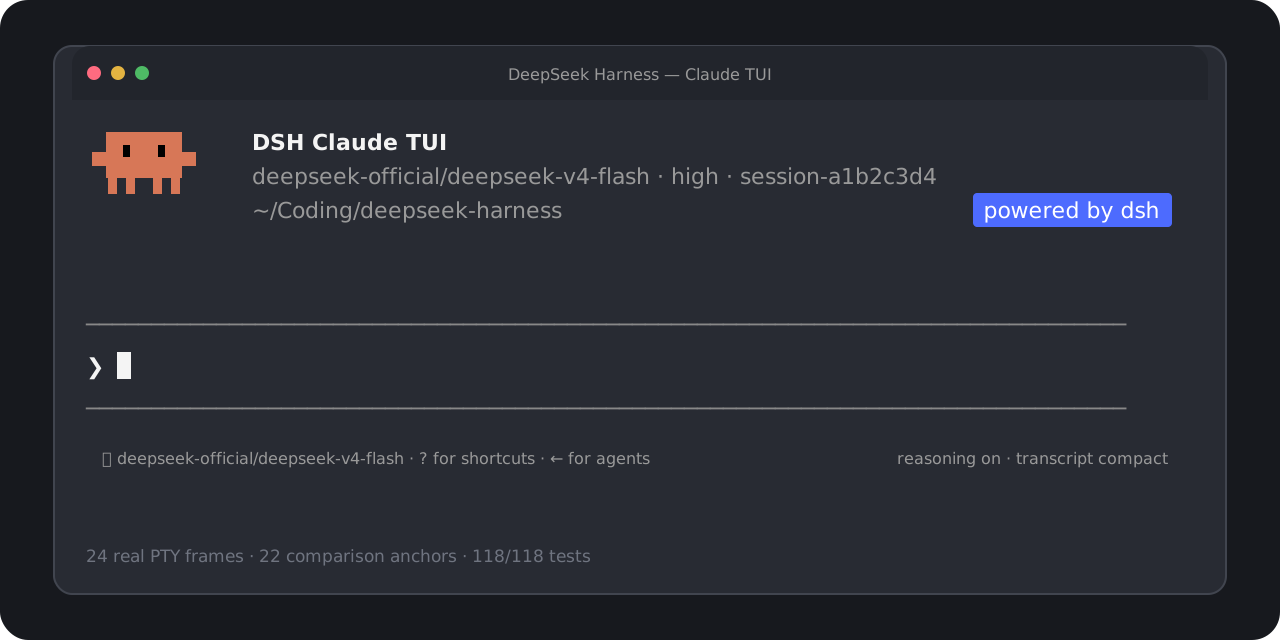
A Claude Code-style terminal workflow, powered by DeepSeek Harness.
English · 简体中文
Start in one command. Use real DSH models, Sessions, tools, approvals, and subagents
through a familiar, high-fidelity terminal interface.




[!NOTE] This is an independent community project. It is not affiliated with, endorsed by, or sponsored by Anthropic or DeepSeek. “Claude Code” identifies the version-pinned interaction target; no Anthropic source code is included. See the trademark and compatibility notice.
Start in one command
Requires Node.js 22.19+ or 24+.
npx dsh-claude-tui
That command installs and opens the TUI. You do not need a global dsh, a repository checkout, pnpm, or manual profile setup. The current release is dsh-claude-tui@0.1.1.
A real model request needs credentials for the DSH provider you select. Use /provider to inspect or enter credentials and /model (or Option+P / Alt+P) to switch among models and effort levels exposed by DSH.
For repeat use:
npm install --global dsh-claude-tui@0.1.1
dsh-claude-tui
Resume work with dsh-claude-tui --resume for the session picker, or --resume <session-id> for an exact Session.
What you get
| Area | User-facing behavior |
|---|---|
| Familiar terminal | Claude-shaped welcome panel, prompt, menus, transcript, status rows, approvals, questions, and Agent states |
| Real Harness runtime | DSH-owned models, durable Sessions, commands, approval policies, tools, structured questions, and subagents |
| Live model setup | Provider/model catalog, advertised effort levels, saved defaults, masked API-key entry, and credential-source visibility |
| Productive prompting | Multiline editing, submit or steer, cancellation, history search, slash completion, and bounded @ file mentions |
| Clear execution | Reasoning and tool activity, compact/expanded results, cache hit rate, token totals, TTFT, throughput, and turn outcome |
| Session and Agent flow | New or resumed Sessions, graceful flush, foreground/background subagents, and an active-agent roster |
| Verified runtime identity | Welcome panel shows the actual TUI/Harness version, bundled or system runtime, DSH Home, and tool mode |
The TUI reads runtime capabilities from DSH rather than shipping hardcoded model, effort, credential, or approval behavior.
Everyday controls
| Key or command | Action |
|---|---|
Enter | Submit while idle or steer a running Agent |
Shift+Enter | Insert a newline |
Esc / Ctrl+C | Interrupt the active turn |
Ctrl+R | Search prompt history |
Ctrl+O | Expand or compact tool details |
Option+P / Alt+P or /model | Open the live DSH model picker |
/provider | Inspect or update DSH provider credentials |
Left Arrow | Hide or show the active-agent roster |
Ctrl+D | Press twice on an empty prompt to exit cleanly |
Run /help inside the TUI for the current command list.
Works with an existing DSH setup
The default launcher mode is designed to get users into the TUI without making them choose an installation strategy:
- Reuse a compatible DSH already associated with the selected
$DSH_HOME, or a verifiabledshonPATH. - Probe it in an isolated, credential-free temporary Home.
- Fall back to the bundled, shrinkwrap-pinned DSH
0.1.0-rc.6when no external runtime qualifies.
Compatible external DSH currently means >=0.1.0-rc.6 <0.1.1 plus a successful Agent/Session probe. When a Home can be shared safely, existing credentials, Sessions, settings, and unrelated profiles remain available. The launcher does not overwrite an unowned profile. An unsafe implicit default can fall back to ~/.dsh-claude-tui with a visible notice; an explicit DSH_HOME conflict fails with an actionable error instead of silently moving data.
Useful environment controls:
| Variable | Behavior |
|---|---|
DSH_CLAUDE_TUI_RUNTIME=auto | Default: try compatible system DSH, then bundled DSH |
DSH_CLAUDE_TUI_RUNTIME=system | Require a compatible external DSH |
DSH_CLAUDE_TUI_RUNTIME=bundled | Always use the packaged DSH |
DSH_HOME=/path | Use an explicit DSH data Home |
DSH_TOOLS_MODE=native|code|both | DSH tool presentation shown as Standard, PTC, or Both |
Do not run different Harness versions concurrently against the same $DSH_HOME; use separate Homes for concurrent processes. Harness is pre-release, so move data only through an explicitly supported Harness migration path. See Launcher environment compatibility for the full selection and recovery contract.
Compatibility and verification
The interaction target is the observed Claude Code 2.1.227 TUI. Harness remains the source of truth; Claude-only model behavior, cloud services, account state, and private permission semantics are not simulated.
Current qualification:
- macOS arm64 and Linux x64;
- true-color, xterm-compatible terminals;
- 24 independently captured PTY reference frames and 22 automated visual/semantic anchors;
- 118/118 tests, including
80x24,100x30, packed-tarball execution, Session resume, approvals, questions, and foreground/background subagents.
The Windows launcher path exists but is not yet release-qualified. Read the full visual and semantic qualification report or the v0.1.0 artifact-hardening baseline.
Develop and contribute
corepack pnpm install --frozen-lockfile
corepack pnpm check
The check gate runs TypeScript validation, all Vitest terminal tests, and the production build. Focused issues and pull requests are welcome; visual-parity changes should include an independently captured reference or a documented Harness-semantic boundary.
Near-term work includes richer attachments and completion, broader Session management, more plan/todo/background-job states, and qualification across more terminals and operating systems.
License
Original project code is available under the MIT License. Product names and marks remain the property of their respective owners; the MIT License does not grant rights to third-party trademarks.
Related DeepSeek Harness Plugins
Browse Developer Tools →
为 DeepSeek Harness (DSH) 插件生态打造的现代化桌面端解决方案。万物皆「插件」,桌面本身也是「插件」。

The plugin market inside DeepSeek Harness — browse, search, one-click install · DSH 可视化插件市场

Whale Girl skin series for DeepSeek Harness. 适用于 DeepSeek Harness 的,鲸鱼娘系列皮肤。

把 DeepSeek Harness 装进你的口袋:电脑上跑 dsh web,手机扫码即同步访问(局域网 + 公网,实时同屏)Put DeepSeek Harness in your pocket: run dsh web on your computer and access it synchronously by scanning a QR code on your phone (LAN + public network, real‑time screen mirroring)