

DSH Codex Meter
☆ 1Native Settings → Usage dashboard for DeepSeek Harness: balance, official token and cost analysis, trends, context warnings, API activity, and Tailscale remote access.
Get this plugin
Review the source, then continue to the publisher.
dsh plugin --profile <name> add dsh-codex-meterAbout this plugin
Source snapshot 8/18/2026dsh-codex-meter
DeepSeek API 用量监控插件(DSH web GUI):原生 Settings → Usage 页面,实时显示账户余额、官方今日消费与月度趋势。界面全部为英文。
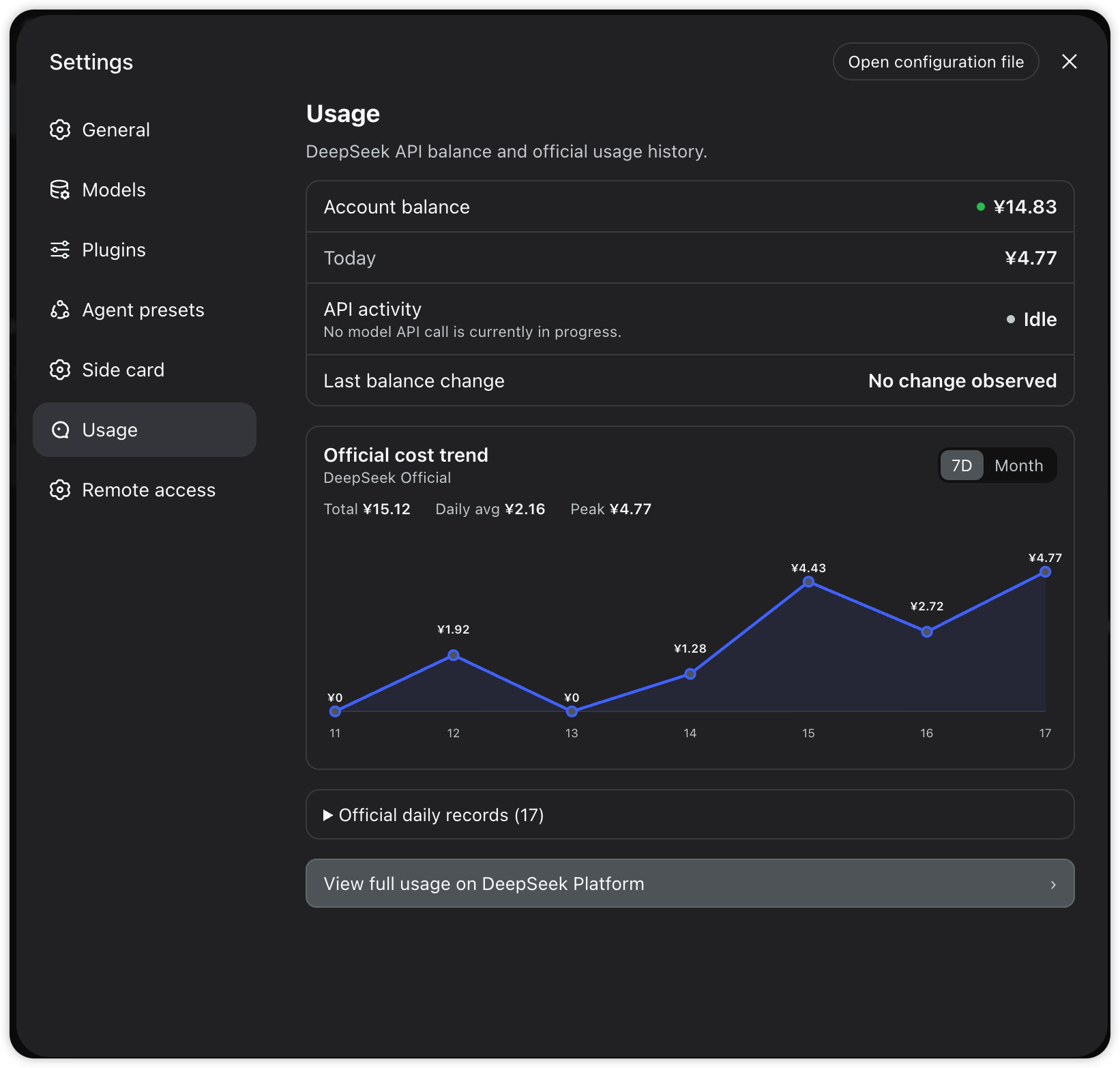
功能
- Settings → Usage 原生页面(设置 → 通用 → Usage),不再是右下角悬浮胶囊
- 圆形仪表图标:Settings 侧栏 Usage 入口使用自定义圆形仪表图标(非默认齿轮)
- 数据项均为英文标签:
Account balance— DeepSeek API 剩余余额(官方/user/balance,实时准确)Today— 今日已消费(配置平台 token 后为官方数据;否则≈本地估算,估算值明确带≈前缀)Last balance change— 最近一次观测到的余额变动(含观测时间,+/−带符号显示)
- Official cost trend 官方费用趋势折线图:
7D/Month两个视图切换;今天之后的日期会被过滤掉(平台对本月剩余日期返回零值占位,不画进图里)- 每个每日费用点都显示数据标签(悬停还有 tooltip)
- 周期统计:
Total(合计)/Daily avg(日均)/Peak(峰值) Official daily records (N)可展开查看逐日官方明细
- API activity 实时 API 活动状态:
Active= 确有 llm/stream 模型请求在运行(显示进行中的调用数与已耗时);Idle= 无模型 API 请求- 工具执行、权限等待等不会被误报为活跃 API 调用;Active 仅表示计费可能在进行中,最终费用以官方数据为准
- 活动状态轮询是纯本地的(1s 本地路由),不会产生额外的 DeepSeek 模型调用
- Remote access 远程访问(Settings 内独立分区):通过私有 Tailscale 网络从手机打开 DSH(
tailscale serve,无公网 URL),支持配对链接、一键启停、Tailscale 一次性授权引导 View full usage on DeepSeek Platform按钮:打开 DeepSeek 平台用量页(明细 + 充值)- 窗口隐藏/最小化时暂停轮询,恢复可见立即补刷;数值无变化时不触发重渲染
- 平台 token 过期/失效时,Today 行标签变为
Today (refresh needed),不会静默退回估算 - 只使用
--dsw-*主题变量,跟随浅色 / 深色模式与应用字号缩放 - 密钥不出本机:浏览器只访问宿主本地路由;仓库中不存储任何密钥值,也不会把密钥发送给浏览器
安装(桌面版手动方式)
本插件按 DSH 标准 bundle 插件设计(dsh.bundle.patch + dsh.client),正常可用 dsh plugin --profile <name> add dsh-codex-meter 安装。桌面版(DSH Desktop 2.x)的手动接线方式:
-
将本包放入 profile 的 node_modules:
PROFILE=~/.dsh/profiles/desktop mkdir -p "$PROFILE/node_modules" cp -R dsh-codex-meter "$PROFILE/node_modules/" -
桌面版 profile 的 node_modules 为空,插件的宿主依赖需软链到桌面自带 bundle:
mkdir -p "$PROFILE/node_modules/@deepseek-ai" ln -sfn "/Applications/DSH Desktop.app/Contents/Resources/app.asar.unpacked/node_modules/@deepseek-ai/dsh-credentials" \ "$PROFILE/node_modules/@deepseek-ai/dsh-credentials" -
在
$PROFILE/cordis.patch.yml追加 loader 条目:- insert: - id: codex-meter name: dsh-codex-meter -
完全重启 DSH Desktop(退出再打开)。重启后进入 Settings → Usage 查看。
若用 CLI 版
dsh web:profile 自带完整 pnpm workspace,直接dsh plugin --profile web add dsh-codex-meter即可,无需手动接线。
配置
-
余额读取复用
DEEPSEEK_API_KEY(设置 → 模型,或~/.dsh/.credentials.yaml)。 -
官方数据需要
DEEPSEEK_PLATFORM_TOKEN(趋势图、今日官方消费、逐日明细均来自官方接口): 登录 platform.deepseek.com → DevTools → Console →JSON.parse(localStorage.getItem('userToken')).value, 存到~/.dsh/.credentials.yaml:DEEPSEEK_PLATFORM_TOKEN: <token>配置后 Today / 趋势图显示官方精确数据;token 会随平台会话过期,失效时 Today 行显示
Today (refresh needed)并自动退回≈估算(数据落~/.dsh/storages/codex-meter-day.json), 重新按上述步骤取新 token 即可恢复。 -
观测到的余额变动记录在
~/.dsh/storages/codex-meter-balance-history.json(运行期数据,不入库)。
宿主路由
| 路由 | 说明 |
|---|---|
GET /api/codex-meter/balance | 余额、官方月度用量历史(未来日期已过滤)、Today 来源/状态(official/estimate + token 状态)、观测到的余额变动(含时间戳) |
GET /api/codex-meter/api-activity | 仅非敏感的实时模型调用元数据(id/启动时间/provider/model/sessionId),无提示词、无密钥;工具执行与权限等待不计入 |
GET /api/codex-meter/session-cost?sessionId= | 会话费用:宿主按会话日志回放计价(注意:这是本地估算,不是官方账户扣费记录;Usage 页面不使用它) |
GET/POST /api/codex-meter/remote-status /remote-enable /remote-disable | Tailscale 远程访问状态/启停(启停仅接受本机回环请求) |
开发
git clone <fork>
cd dsh-codex-meter
# 改 lib/index.js(宿主)/ lib/client.js(浏览器端 Usage 页面)
# 同步到已安装副本并重启桌面端验证
许可
MIT。价格引擎移植自 bpc-oss/dsh-web-billing(MIT), 宿主逻辑参考 dsh-deepseek-quota(MIT)。
Related DeepSeek Harness Plugins
Browse Sessions →
为 DeepSeek Harness 带来「跨会话长期记忆 + 后台自我进化」能力的纯插件实现:五轨记忆 · git 分支感知 · 回合内自我审查 · 技能自我进化与技能管理器 · 四轨待办 · COI 调度 · 会话广播 · 会话搜索 · 提示词管理器 · 临时信息便签——零核心修改、零运行时依赖,随装随用、卸载即净。

DSH 插件:便捷无感的同窗口内对话回退,从不新建分支;自带轻量工作区备份,可一并还原文件(Claude Code /rewind 语义)。 · DSH plugin: effortless in-window conversation rewind — never forking a new session; ships a lightweight workspace backup that restores files together with the rewind (Claude Code /rewind semantics).

DSH Archive Manager — 在 DeepSeek Harness 中安全查看、恢复和管理已归档会话 · Safely view, restore, and manage archived sessions in DSH

DSH 会话管理插件:删除(回收站恢复/彻底清除)、统计、继续/暂停、打开日志目录、对话顶部抽屉、工作区分组与排序、上下文压缩阈值设置。DSH session manager: delete with trash/restore/purge, stats, continue/pause, log folder, header drawer, workspace grouping, context compaction threshold.