

Get this plugin
Review the source, then continue to the publisher.
dsh plugin install . # 安装(默认禁用)/ install (disabled by default)About this plugin
Source snapshot 8/13/2026dsh-chat-width
中 / EN:DSH Web 消息宽度调节插件 —— AI 回复的消息列固定宽度、屏幕再宽也是左右留白,本插件让你拖动即可调整展示宽度。 A DSH Web plugin for adjusting the message column width: AI replies render in a fixed-width centered column with empty gutters on wide screens — drag to resize.
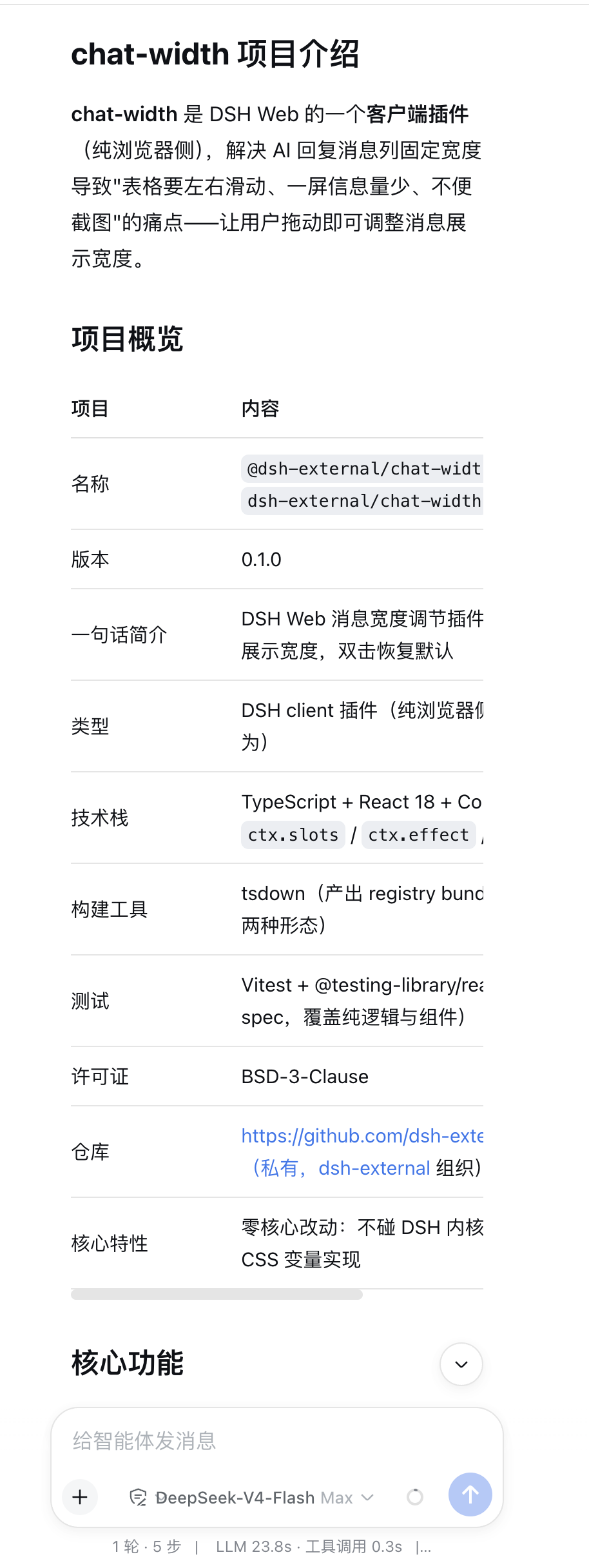 |  |
| 项目概览 / Project Overview | 插件介绍 / Plugin Introduction |
简介 / Introduction
中:chat-width 是 DSH Web 的一个客户端插件(纯浏览器侧),解决 AI 回复消息列固定宽度导致"表格要左右滑动、一屏信息量少、不便截图"的痛点——让用户拖动即可调整消息展示宽度。
EN: chat-width is a client-side plugin (browser-only) for DSH Web. It solves the pain of a fixed-width message column — wide tables need horizontal scrolling, one screen shows too little information, and screenshots are hard to compose — by letting you drag to resize the message column.
原本的痛点 / The Original Pain Points
| 中文 | English |
|---|---|
| 很多表格需要左右滑动才能看到完整信息 | Many tables need horizontal scrolling to show their full content |
| 一个屏幕下显示的信息量不够多,不方便截图 | A single screen shows too little information to fit into one screenshot |
用法 / Usage
中:鼠标移到输入框左右边缘(出现竖线),按住左右拖动即可调宽——手柄虽在输入框两侧,但调整的是正文消息的宽度,正文会同步变宽/变窄。双击恢复默认。
EN: Move the mouse to either edge of the input box (a vertical line appears), press and drag left/right to resize — the grips sit on the input box, but they resize the message column, so the conversation content follows. Double-click to restore the default.
核心功能 / Core Features
| 功能 / Feature | 说明 / Description |
|---|---|
| 拖动手柄调宽 / Drag grips | 输入框左右边缘出现手柄,拖动即调整正文消息列宽度(手柄在输入框两侧,调的却是消息列) Grips appear on the input box edges; dragging resizes the message column (the grips sit on the input box, but resize the column) |
| 双击恢复默认 / Double-click reset | 双击手柄恢复官方默认宽度 Double-click a grip to restore the official default width |
| 设置页预设 / Presets in settings | 紧凑 640 / 宽 960 / 超宽 1280 三个预设(8px 步进,320–2560px 范围) Three presets: Compact 640 / Wide 960 / Ultra 1280 (8px step, 320–2560px range) |
| 自定义输入 / Custom input | 设置页可手动输入任意像素值,非法输入自动钳制/拒绝 Type any pixel value in the settings page; invalid input is clamped or rejected |
| 持久化 / Persistence | localStorage 持久化;拖动时 300ms 节流写入,操作结束立即写入 Persisted via localStorage; writes are throttled at 300ms while dragging and flushed immediately on release |
| 会话内即时生效 / Live effect | 宽度实时作用于文档样式表,无需刷新页面 Width applies to the live stylesheets instantly — no page refresh needed |
安装 / Installation
方式一:plugin-registry(推荐,需宿主已集成 plugin-registry)
中:通过 dsh plugin 命令安装与管理,安装默认禁用、显式启用,Web 刷新后实时挂载。
EN: Install and manage via the dsh plugin command. Installed disabled by default, enabled explicitly, mounted live after a Web refresh.
git clone https://github.com/chen-001/dsh-chat-width.git
cd chat-width && pnpm install && pnpm run build   # 产出 client.js(registry bundle)/ produces client.js (registry bundle)
dsh plugin install .           # 安装(默认禁用)/ install (disabled by default)
dsh plugin enable chen-001/dsh-chat-width   # 启用(实时挂载,Web 刷新后生效)/ enable (mounted live, active after Web refresh)
dsh plugin list                # 验证 enabled chen-001/dsh-chat-width@0.1.0 / verify enabled chen-001/dsh-chat-width@0.1.0
方式二:官方通道(config.yaml insert,未集成 registry 时用)
中:一键安装脚本自动装入 DSH 并写入配置。
EN: A one-command install script that links the plugin into DSH and writes the config.
git clone https://github.com/chen-001/dsh-chat-width.git
sh chat-width/install.sh   # 自动装入 DSH 并写入配置 / links into DSH and writes the config
重启 dsh web 生效。 / Restart dsh web to activate.
中:私有仓库,仅限 chen-001 组织成员使用。 EN: Private repository, for chen-001 org members only.
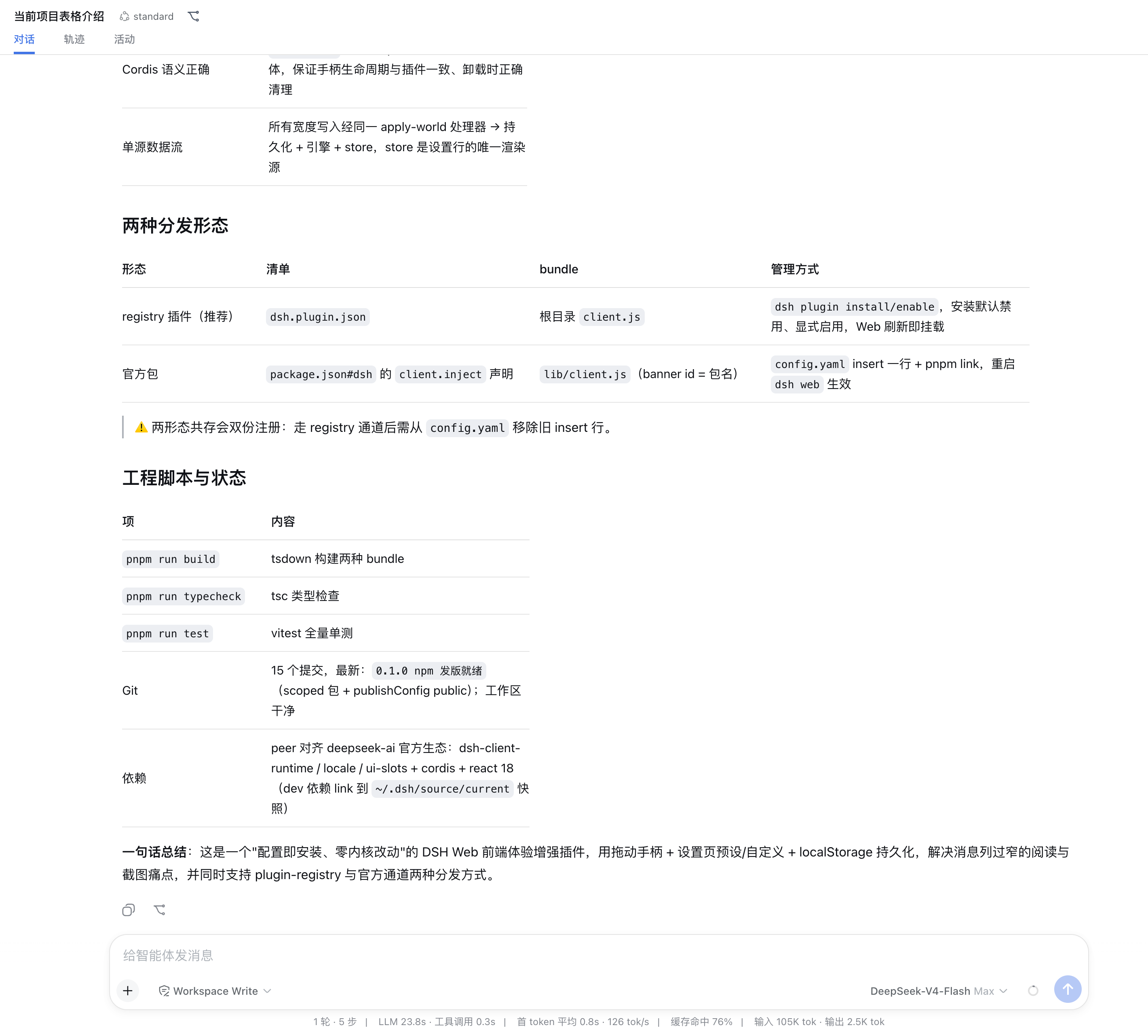
两种分发形态 / Two Distribution Forms
| 形态 / Form | 清单 / Manifest | bundle | 管理 / Management |
|---|---|---|---|
| registry 插件 / Registry plugin | dsh.plugin.json(id: chen-001/dsh-chat-width) | 根目录 client.js(banner id = 插件 id,无 @)root client.js (banner id = plugin id, no @) | dsh plugin / Web 面板,安装默认禁用、显式启用dsh plugin / Web panel, installed disabled, enabled explicitly |
| 官方包 / Official package | package.json#dshClient | lib/client.js(banner id = 包名 @chen-001/dsh-chat-width) | config.yaml insert + pnpm link |
中:两者是同一功能的两种发布形态,bundle 各自构建、互不影响;registry 通道启用后请从 config.yaml 移除旧 insert 行,避免双份注册。
EN: The two are two release forms of the same feature; each bundle is built independently and they do not interfere. After enabling the registry channel, remove the old insert line from config.yaml to avoid double registration.
技术实现要点 / Technical Highlights
| 要点 / Highlight | 说明 / Description |
|---|---|
| 零核心改动 / Zero core changes | 不动 DSH 内核,仅操作文档样式表 + 插槽注册,配置即安装 No DSH core changes — only live stylesheets + slot registration; config is the install |
| 手柄定位"实测不假设" / Measured, not assumed | 手柄钉在输入卡([data-composer-seat])边缘,通过 --dsh-composer-card-max-width 的 live var() probe 实测宽度;无卡片时回退到滚动区中心公式并钳制Grips pin to the composer card edges via a live var() probe; fall back to the scroll-area center formula with clamping when no card exists |
| 可见性声明式 / Declarative visibility | body:has([data-conversation-scroll]) + hover 透明度:仅聊天渲染时存在手柄、悬停才显示,页面上无永久竖线body:has(...) + hover opacity: grips exist only while a chat renders and show only under the pointer — no permanent vertical lines |
| 布局漂移跟随 / Layout drift tracking | window resize + MutationObserver(rAF 合并)重定位手柄,覆盖切会话/折叠侧栏等场景 window resize + MutationObserver (rAF-coalesced) re-pins the grips across session switches, sidebar collapses, etc. |
| Cordis 语义正确 / Correct Cordis semantics | ctx.effect 返回 disposer 闭包,保证手柄生命周期与插件一致、卸载时正确清理ctx.effect returns a disposer closure so handle lifetime matches the plugin and cleanup is correct on unload |
| 单源数据流 / Single source of truth | 所有宽度写入经同一处理器 → 持久化 + 引擎 + store,store 是设置行的唯一渲染源 All width writes flow through one handler → persistence + engine + store; the store is the only render source |
工程脚本与状态 / Scripts & Status
| 项 / Item | 内容 / Content |
|---|---|
pnpm run build | tsdown 构建两种 bundle / builds both bundles |
pnpm run typecheck | tsc 类型检查 / TypeScript type check |
pnpm run test | vitest 全量单测 / full unit test suite (vitest) |
| Git | 15 个提交,最新:0.1.0 npm 发版就绪;工作区干净 / 15 commits, latest: 0.1.0 npm release-ready; clean worktree |
| 依赖 / Dependencies | peer 对齐 deepseek-ai 官方生态:dsh-client-runtime / locale / ui-slots + cordis + react 18(dev 依赖 link 到 ~/.dsh/source/current 快照)peers aligned with the official deepseek-ai ecosystem: dsh-client-runtime / locale / ui-slots + cordis + react 18 (dev deps link to the ~/.dsh/source/current snapshot) |
一句话总结 / One-line Summary
中:这是一个"配置即安装、零内核改动"的 DSH Web 前端体验增强插件,用拖动手柄 + 设置页预设/自定义 + localStorage 持久化,解决消息列过窄的阅读与截图痛点,并同时支持 plugin-registry 与官方通道两种分发方式。
EN: A "config-is-install, zero core changes" DSH Web UX-enhancement plugin that fixes the narrow-column reading and screenshot pain points via drag grips + settings presets/custom input + localStorage persistence, shipped through both plugin-registry and the official channel.
Related DeepSeek Harness Plugins
Browse Developer Tools →
一个侧边栏的完整工作台,支持三方拓展注册新Tab页面,内置文件渲染编辑/终端/Git/子代理

DSH Web 鲸鱼娘皮肤系列(深海女仆工坊 maid-atelier)——CC BY-NC-SA 4.0

Open DeepSeek Harness workspace directories in VS Code directly from the web GUI.

Obsidian 零成本同步:iPhone ↔ Mac,GitHub 自动备份。本地优先 + 长期积累。|Local First. Zero-cost Obsidian sync across iPhone, Mac & GitHub. Let knowledge grow over time.