

Get this plugin
Review the source, then continue to the publisher.
dsh plugin add @dsh-external/dsh-side-panel@latest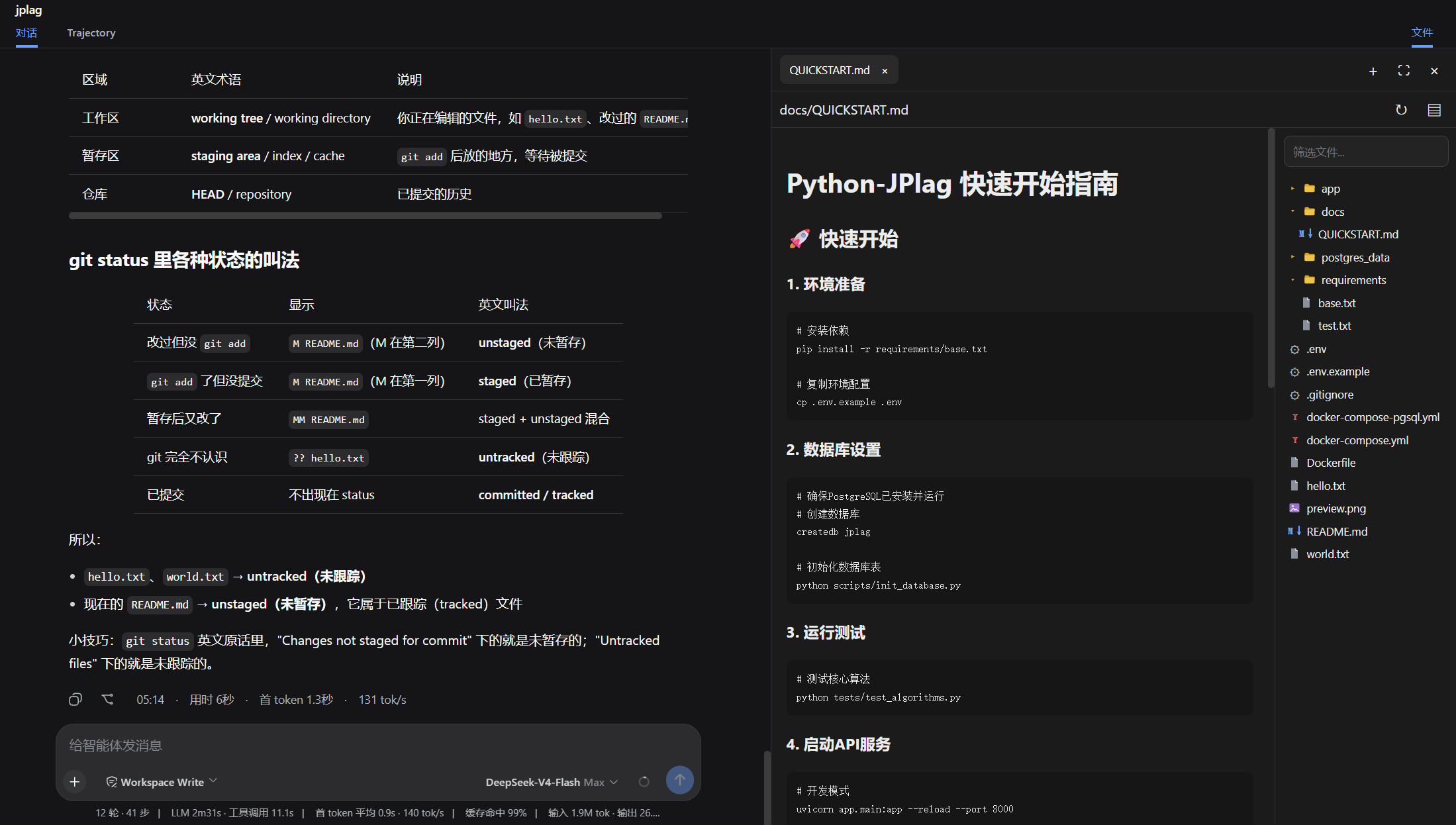
About this plugin
Source snapshot 8/13/2026dsh-side-panel
DSH Web 的右侧工作区面板,在当前会话旁集中提供 Git 审查、终端和文件操作。 可以点击dsh会话区弹出的文件链接,会自动打开相应的文件以供审阅。
功能
- Git审查,可以查看工作区和暂存区的文件,以及dsh每轮修改的代码,后续会增加回退。
- 文件浏览器, 可以在会话区点击文件跳转到文件浏览器浏览文件。
- 终端,在当前工作区直接运行命令,无需离开工作区,专注你的任务。
安装
从 github-dsh-external仓库安装
dsh plugin --profile web add github:dsh-external/dsh-side-panel
dsh web
或者可以先从git clone 到本地,然后从本地目录安装
git clone git@github.com:dsh-external/dsh-side-panel.git
cd dsh-side-panel
npm install
npm run build
dsh plugin --profile web add .
配置
组合包默认启用以下配置:
- insert:
    - id: side-panel
      name: '@dsh-external/dsh-side-panel'
      config:
        maxTextBytes: 2097152
        maxImageBytes: 10485760
        searchMaxResults: 200
| 配置项 | 默认值 | 说明 |
|---|---|---|
maxTextBytes | 2 MiB | 可读取和编辑的单个文本文件大小上限 |
maxImageBytes | 10 MiB | 可预览的单个图片大小上限 |
searchMaxResults | 200 | 文件筛选返回的最大结果数 |
许可
BSD 3-Clause License
Related DeepSeek Harness Plugins
Browse Developer Tools →
DSH Better Sidebaromdsh-dev
☆ 72一个侧边栏的完整工作台,支持三方拓展注册新Tab页面,内置文件渲染编辑/终端/Git/子代理
TypeScriptView details →

DSH Deep WhaleSmall-tailqwq
☆ 65DSH Web 鲸鱼娘皮肤系列(深海女仆工坊 maid-atelier)——CC BY-NC-SA 4.0
TypeScriptView details →

DSH Open In Vscodeomdsh-dev
☆ 29Open DeepSeek Harness workspace directories in VS Code directly from the web GUI.
JavaScriptView details →

zeromdyuukiLike
☆ 26Obsidian 零成本同步:iPhone ↔ Mac,GitHub 自动备份。本地优先 + 长期积累。|Local First. Zero-cost Obsidian sync across iPhone, Mac & GitHub. Let knowledge grow over time.
ShellView details →