

chicheng-cron
☆ 5DSH 定时任务插件:侧栏「定时任务」入口,cron 定时执行 shell / python / node 脚本、Skill 与 Agent 任务;支持 chicheng-push 与 messaging-core 推送通知、会话归档、移动端适配。
Get this plugin
Review the source, then continue to the publisher.
dsh plugin --profile web add github:534119219/chicheng-cronAbout this plugin
Source snapshot 8/18/2026chicheng-cron
DeepSeek Harness(dsh web)的定时任务插件:在左侧栏 「新会话」下方提供 「定时任务」 入口,用 cron 表达式定时执行 Shell / Python / Node 脚本、Skill 或任意 Agent 任务,并支持推送通知、会话整理与移动端适配。
功能
- 侧栏入口:位于「新会话」按钮正下方,展开/收缩态与原生控件一致(rail 18px 图标)
- 任务类型
- Shell 脚本(Windows
cmd.exe/ 其他平台/bin/sh) - Python 脚本(自动探测
python/py/python3) - Node.js 脚本(当前 Node 运行时)
- Skill(自动注入已安装 skill 的完整说明给 Agent 执行)
- 交给 Agent(自由提示词,由 headless dsh Agent 完成任意任务)
- Shell 脚本(Windows
- 调度:标准 5/6 字段 cron(
*/n、a-b、列表、月份/星期缩写)、@hourly–@yearly、@every <n>s|m|h|d;本地时间计算,重启后自动恢复 - 推送通知:对接 chicheng-push(Server酱/PushPlus/Bark/钉钉/企微/Telegram/飞书/Webhook 等渠道)与 messaging-core 消息平台(任意已连接机器人的会话);标题/内容模板支持
{name} {type} {status} {exitCode} {duration} {time} {output}占位符,内容留空自动附带运行输出 - 会话整理:Agent/Skill 运行会话可自动归入侧栏「定时任务」工作区;可开启「成功后自动归档会话」,完成后对话从侧栏隐藏(日志保留)
- 执行历史:状态、退出码、耗时、推送结果、归档标记;输出弹窗查看
- 移动端适配:窄屏单页导航(列表 ↔ 编辑)、执行历史默认收起、16px 输入防 iOS 缩放、安全区适配
截图
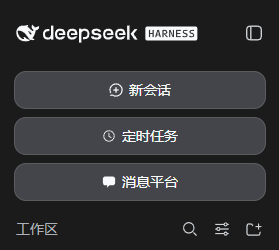 侧栏入口(展开 / 收缩态) |
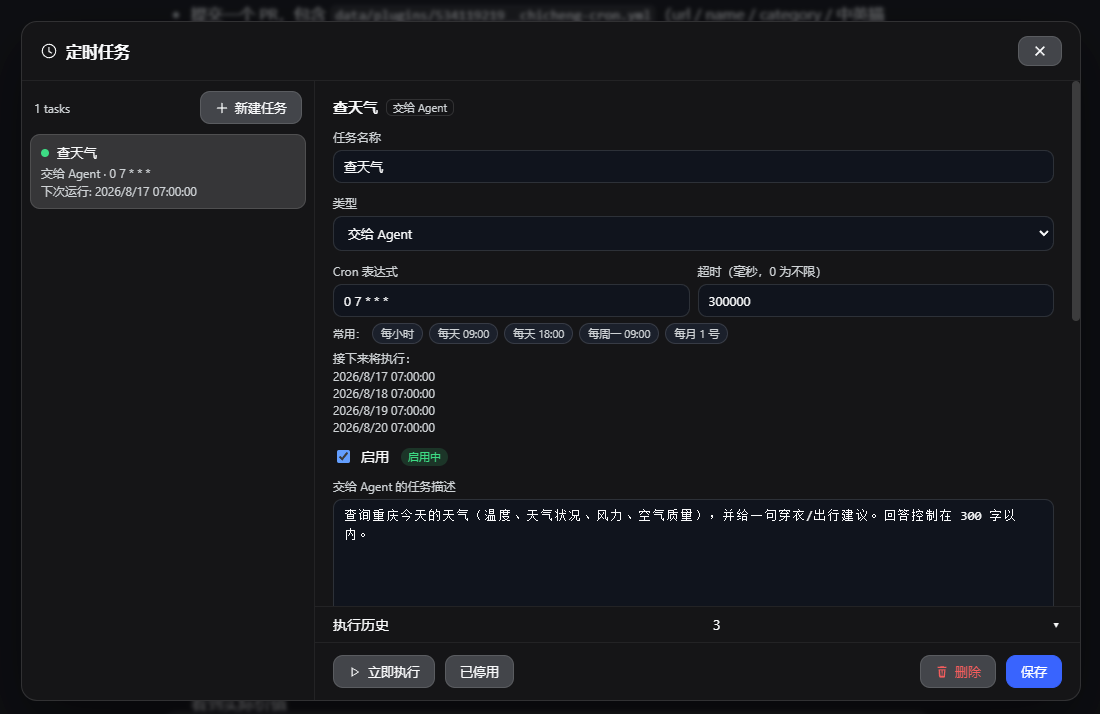 任务与推送设置 1 |
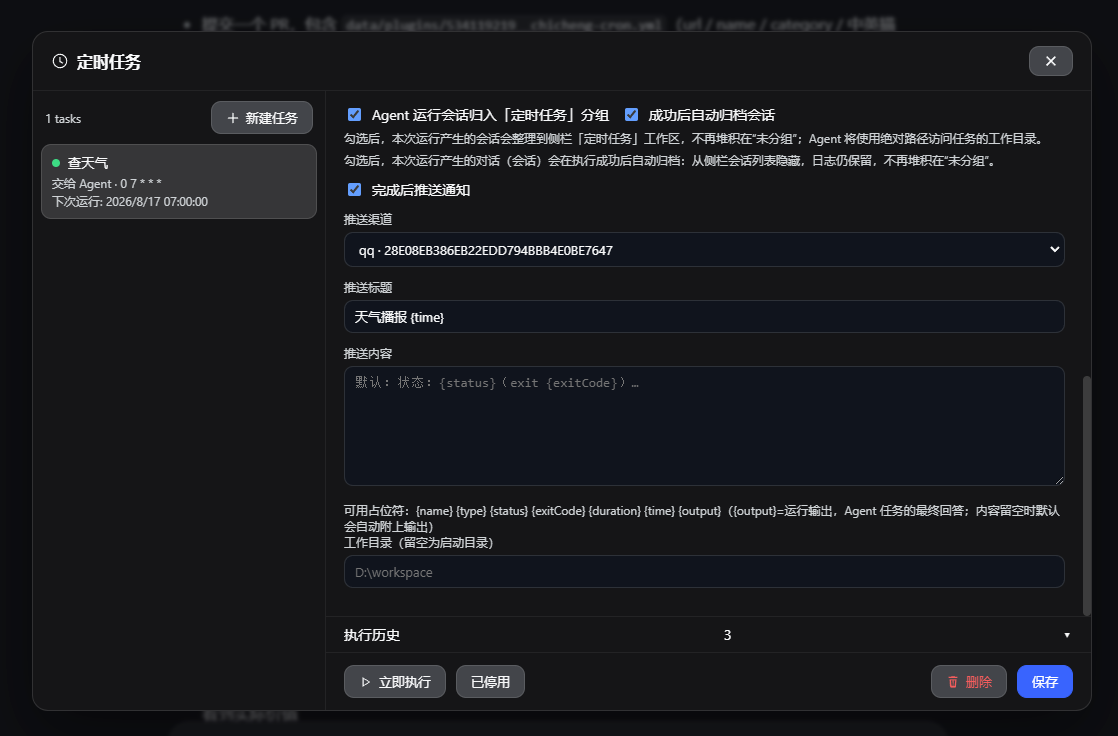 任务与推送设置 2 |
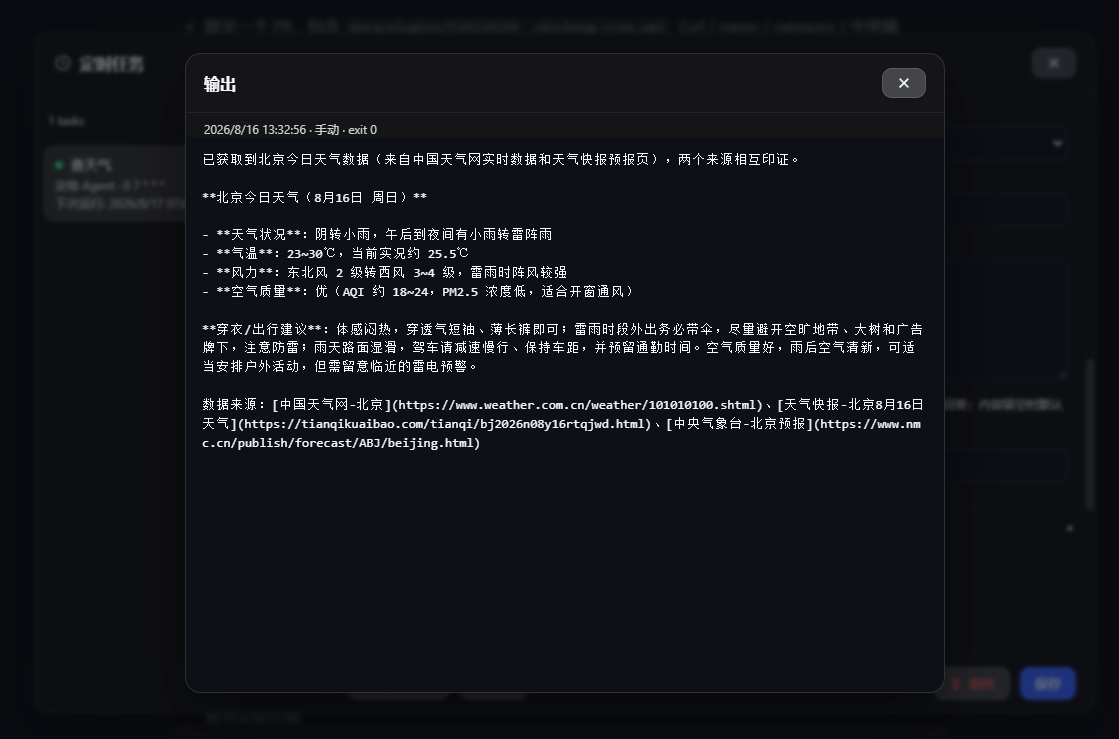 执行历史与输出弹窗 | ||
安装
dsh plugin --profile web add github:534119219/chicheng-cron
安装后重启 dsh web,左侧栏「新会话」下方出现「定时任务」按钮。
从源码开发时提示:
dsh plugin add会把file:依赖物化成目录快照,改源码后可用仓库内scripts/relink-dev.ps1恢复 junction 指向源码。
使用
- 点击侧栏「定时任务」→ 新建任务
- 选择类型并填写:名称、cron 表达式(实时预览下次执行时间)、脚本/提示词、工作目录、超时
- 可选:
- 完成后推送通知:选择渠道(chicheng-push 或 messaging-core 会话)、推送标题/内容(留空用默认,自动附输出)
- Agent/Skill 会话归入「定时任务」分组
- 成功后自动归档会话(对话从侧栏隐藏,日志保留)
- 保存后到点自动执行;「立即执行」可随时手动触发,执行历史查看结果与输出
推送模板占位符
| 占位符 | 含义 |
|---|---|
{name} | 任务名称 |
{type} | 任务类型 |
{status} | 完成/失败/超时/运行中 |
{exitCode} | 退出码 |
{duration} | 耗时 |
{time} | 完成时间 |
{output} | 运行输出(Agent 任务的最终回答,前 800 字) |
API(同源 fenced)
list save remove toggle runNow preview runs runOutput skills pushChannels status —— 全部 POST /cron/api/<method>。
数据与限制
- 任务与历史:
$DSH_HOME/cron/store.json;运行输出:$DSH_HOME/cron/runs/ - Agent/Skill 任务通过
dsh --profile headless执行,复用$DSH_HOME/settings.yaml的模型配置 - Web 未运行时错过的时间点不补跑
License
MIT
Related DeepSeek Harness Plugins
Browse Automation →
DSHDesktop:DeepSeek Harness Desktop / DeepSeek Harness 桌面版

Agent OS: the agent gets smarter on its own. We just hold the line: Interview-gated, staged evaluation, budgeted evolution loop. MCP server, 14 runtimes: Claude Code, Codex CLI, Gemini CLI, OpenCode, Copilot, Kiro and more.

开放的侧边栏底座,支持三方拓展注册新侧边栏页面。内置文件渲染编辑/终端/侧边对话/Git/子代理页面 | Open sidebar foundation, supports third-party extensions to register new sidebar pages. Built-in file rendering/editing, terminal, side chat, Git, and sub-agent pages.

DSH 官方公众号收录的 TUI 补位插件:鲸鱼顶栏/实时状态/流式思考/双击 Esc 回滚/上下文进度+TPS。npm 一键装。 DSH official WeChat featured TUI plugin — whale bar, live status, streaming thoughts, double-Esc rollback, context bar + TPS. npm one-click.